flowchart LR
  agentic_redaction_app[Agentic Redaction GUI] --> Qwen_3_6_27B[Qwen 3.6 27B]
  Qwen_3_6_27B --> main_redaction_app[Main Redaction App]
  main_redaction_app --> Qwen_3_6_27B
  main_redaction_app --> PII_model[PII detection model e.g. spaCy]
  main_redaction_app --> OCR_model[OCR model - e.g. PaddleOCR or Tesseract]
Agentic Document Redaction with Qwen 3.6 27B
27 June 2026
Introduction
Document redaction tasks are complex tasks that require text and image recognition capabilities, long context understanding, and the ability to closely followc rules to redact specific information. Recently, local models have been developed that can do this all (e.g. Qwen 3.6). If agents, using these models, can be harnessed to perform contextual-aware redaction, this could result in significant time savings for people performing redaction tasks.
In a previous post, I investigated the possibility of using agentic workflows various LLMs to conduct end-to-end redaction and review. I found that Sonnet 4.6 was able to perform the tasks well, but local models such as Qwen 3.6 27B struggled.
Since then I have optimised the local model settings and agentic harness. I am now getting acceptable results with agentic redaction using Qwen 3.6 27B. In this post we will see that with a higher quantisation level (Q6 vs Q4 for the previous post), and optimised prompting and skills within a minimal agentic harness Pi, local models can successfully perform redaction tasks.
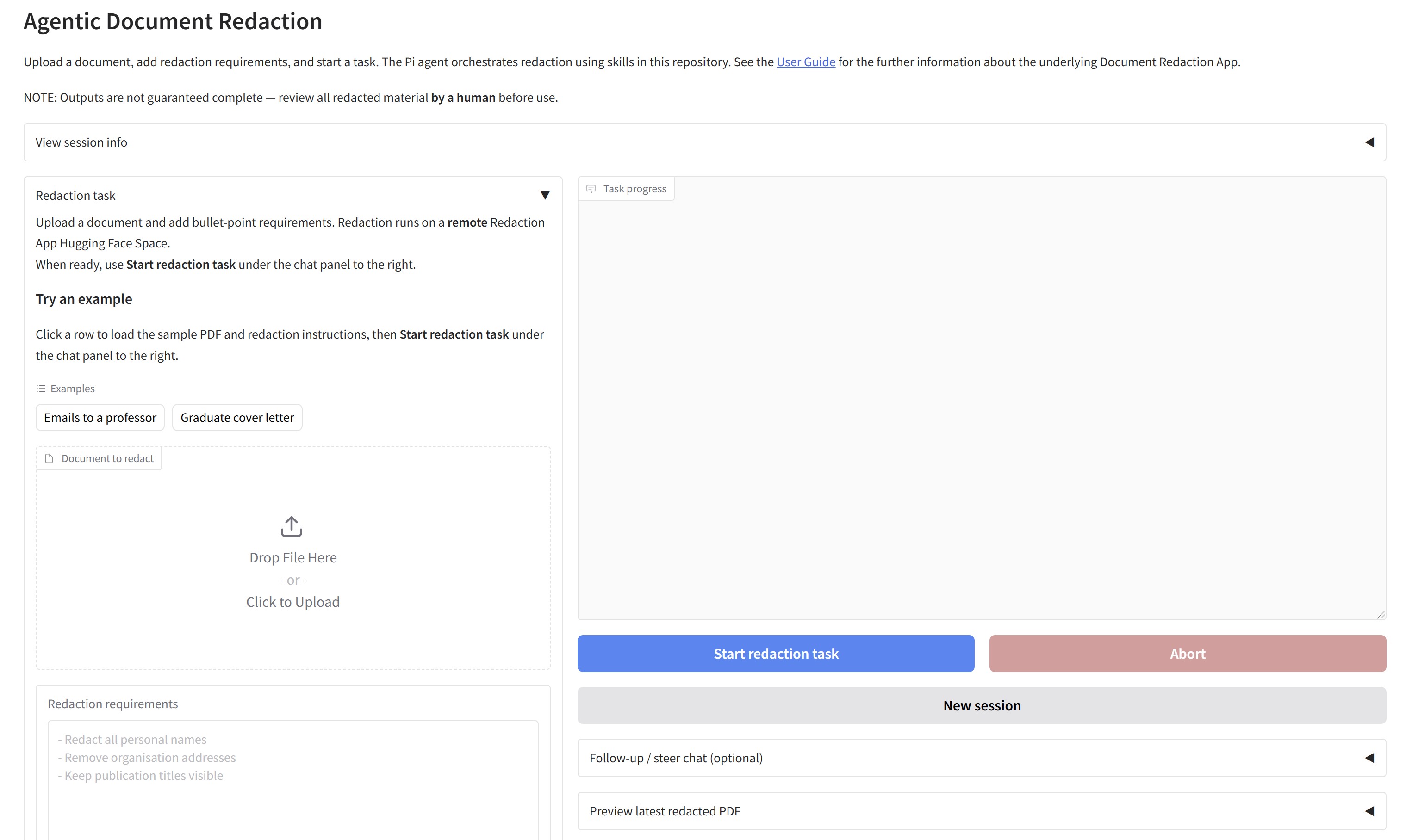
Additionally, I wanted to create an easy to use interface for human operators to interact with the redaction agent. I have created an Agentic GUI specific for redaction tasks (which you can test out here with a free Gemini AI studio API key). This frontend for agentic interaction is a proof of concept to test how human operators could work with an agent to specify redaction rules, steer the agent during a task, or ask follow up questions. The agent returns redacted outputs that are compatible with other software to continue redaction if needed (e.g. the main Redaction app, or Adobe Acrobat Pro).
Below I will go over the system I used to perform agentic redaction with a locally-hosted model on my own system with a frontend Gradio interface. I will evaluate how the model did on three test documents, and discuss where the system could still do better.
Method
The Document redaction app repo contains the code to deploy both the agentic redaction app, and the main Redaction app, which the agent uses as a tool to perform the redaction task. In this solution, Qwen 3.6 27B is deployed locally on my system, and serves both as the agentic model, and also as the VLM model used by the main Redaction app to perform some specialised tasks such as face and signature detection.
Frontend - Agentic Redaction App
The frontend Agentic Redaction App calls the main Redaction App as an API endpoint, using it as a tool to perform the redaction task. A human can use this simple interface request an LLM agent to perform the redaction task for them, in turn using the main Redaction App as a tool.
You can try a demonstration version of the agentic interface here, with a Gemini AI Studio API key needed for the agentic LLM in this instance (free, chosen for this example app as it is not possible to get enough free compute for local model use with Hugging Face to perform full task. With a free API key, gemini-flash-lite-latest (the default) will be adequate to perform the redaction task with the example documents provided.
User instructions and chat interface
The Agentic UI allows users to upload a document, and to pass custom redaction instructions to the Pi agent backend.
When a user gives instructions to the agent in the Agentic Redaction GUI, then clicks ‘Start redaction task’, a prompt is passed to the model that is filled in with the relevant model/workspace information, and the custom instructions from the user. After this, the agent uses its standard set of tools (e.g. to access API endpoints, write files and code) along with the skills to redact the document.
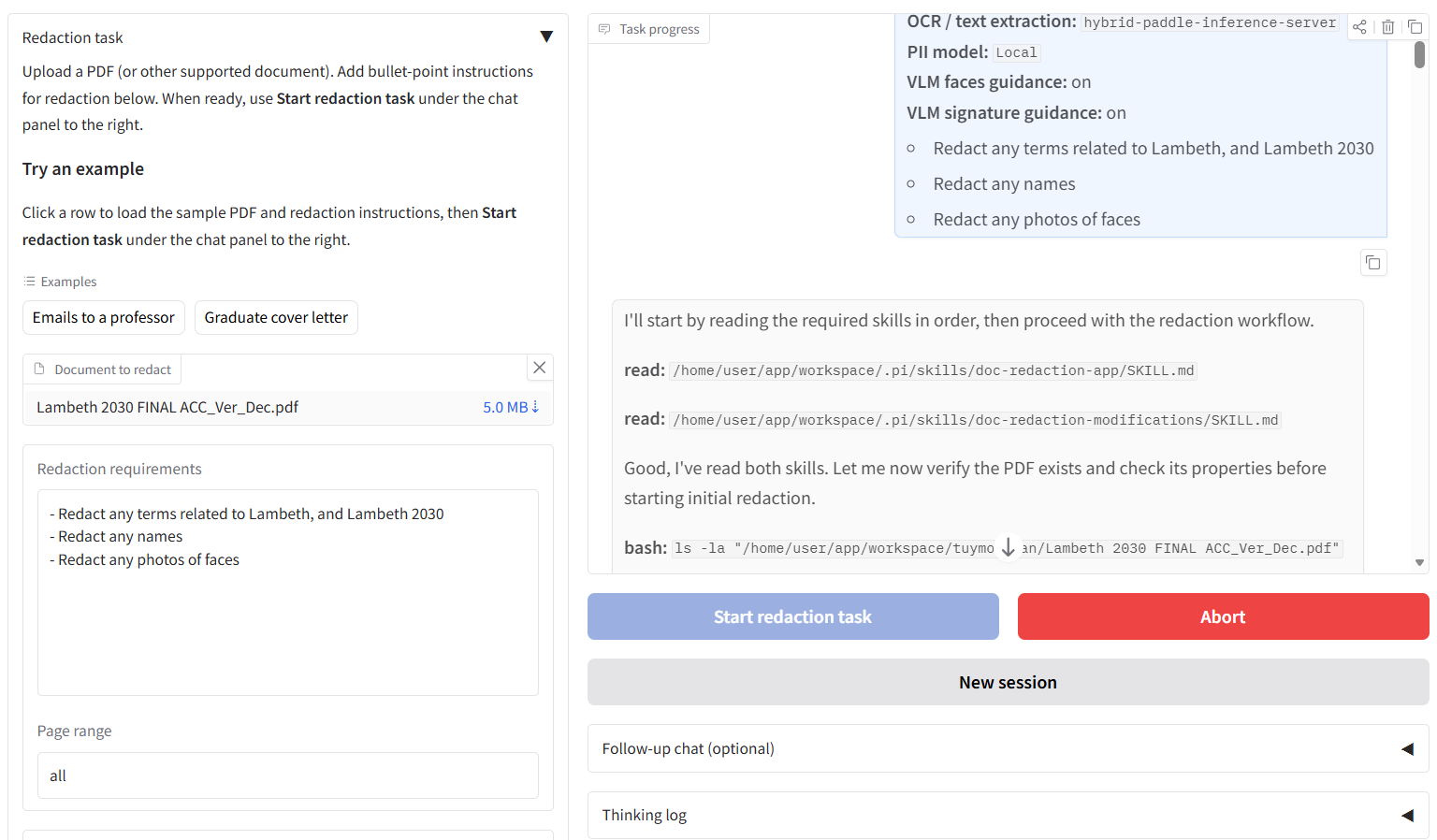
The tool use and some thinking/reporting to the user is streamed to the chatbox on the right while the agent is performing the task, so the user can keep track of progress. The user can send steering messages during the time the agent is redacting a document, or they can send follow up messages once the agent is finished to adjust and improve the redacted outputs according to the user’s requirements.
Returning outputs to the user
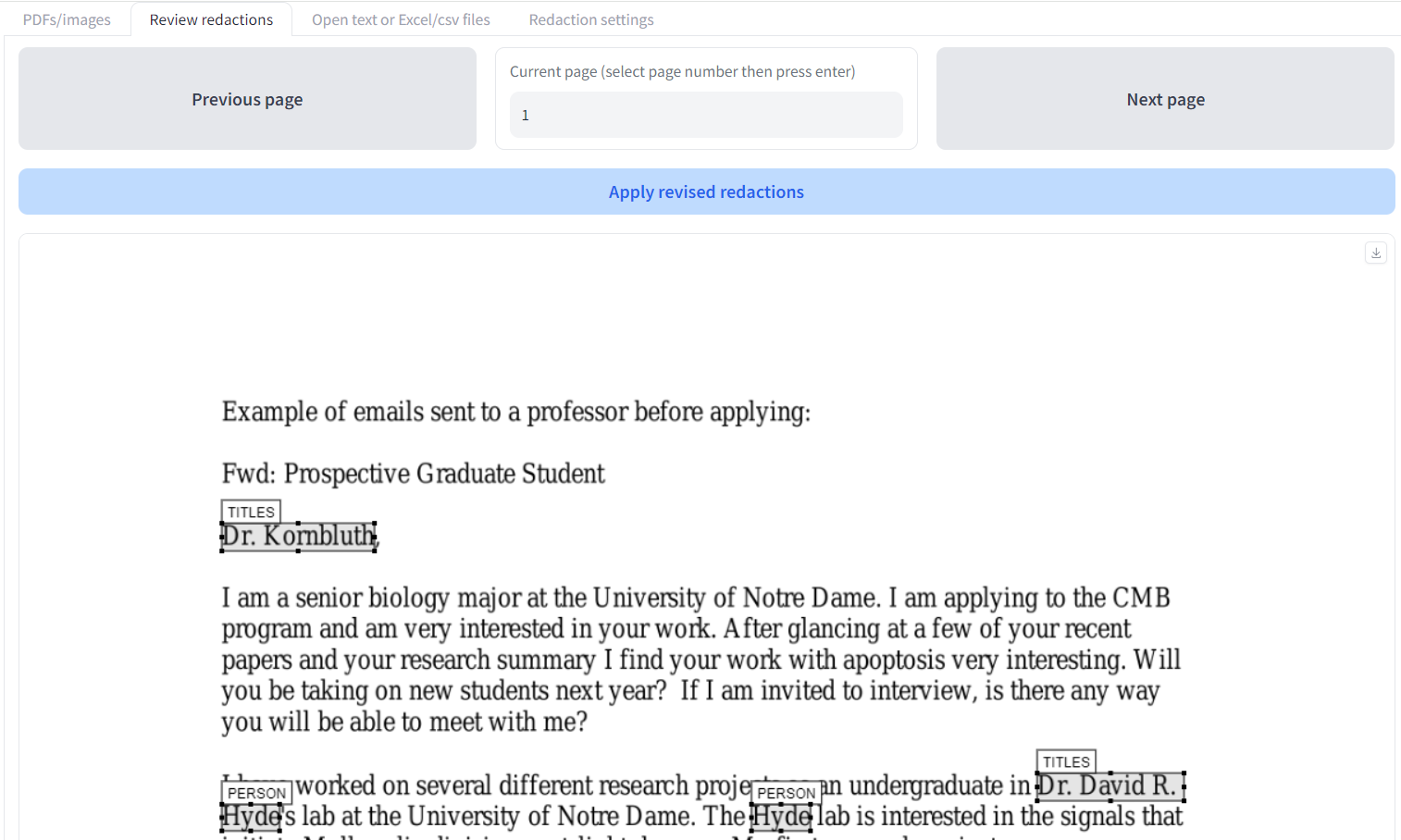
After the agent has completed redaction, the user can download the final redacted documents and related logs from the GUI. The agent produces a redacted PDF output, a CSV log file of all redactions added with relevant details, and a PDF with redaction boxes displayed as comments that can then be used e.g. by Adobe Acrobat Pro, or the main Document Redaction app so that a human reviewer can continue redaction with the outputs from the Agentic GUI. All interim files that the agent produces (including code files) can be accessed by using the file explorer component at the bottom of the page.
The agentic harness, skills, and prompts
An agentic harness based on the minimal Pi agent framework was used as the basis of the workflow. The agent is assigned a workspace folder, and with the Docker-based deployment described below, is restricted to modify specified folders within that container (Dockerfile here).
Specialised skills and prompts were developed after a period of iterative development testing local models with example redaction documents. The agent uses skills for initial redaction, and then reviewing/modifying redaction results. An example of the prompt for a redaction task passed to the agent when clicking ‘Start redaction task’ can be found here.
The main Document Redaction App as a tool for the agent
Serving as the backend in this task, the Document Redaction App is a Gradio UI app that provides a number of FastAPI endpoints for document redaction and review functions, until now used by humans. You can try this out yourself here. For each redaction task, Document Redaction app version 2.4.2 was used.
OCR / PII detection models
The Document Redaction App, that the agent uses as a tool in this task, uses OCR models such as Tesseract and PaddleOCR (ppOCR v6) to extract text locally, and PII identification models such as spaCy (within the Microsoft Presidio package for PII identification). VLM models served locally can be used to highlight faces and signatures in the document, or do a second pass on ‘difficult’ words (a hybrid OCR approach, as shown here).
Local agentic model deployment (Qwen 3.6 27B)
To deploy this system with Qwen 3.6 27B, I used the docker compose file here, and the following command:
docker compose -f docker-compose_llama_agentic.yml --profile 27b_36 up -d pi-agentThis deploys Qwen 3.6 27B using the settings below, quantised to 6 bit with long context (114k tokens at KV cache quantised to 8bit), and runs on a local system with 40GB VRAM. A similar setup could fit into 24GB VRAM by replacing the Hugging Face repo and model with unsloth/Qwen3.6-27B-GGUF and Qwen3.6-27B-UD-Q4_K_XL.gguf respectively (perhaps ctx-size would also need to be lowered a bit). Personally, I found that quantisations lower than Q6 decreased code quality with the Qwen model to the point where completing redaction tasks became difficult.
command:
-hf unsloth/Qwen3.6-27B-MTP-GGUF
--hf-file Qwen3.6-27B-UD-Q6_K_XL.gguf
--mmproj-url https://huggingface.co/unsloth/Qwen3.6-27B-MTP-GGUF/resolve/main/mmproj-BF16.gguf
--n-gpu-layers "-1"
--ctx-size "114688"
-ub "512"
--fit "off"
--temp "0.7"
--top-k "20"
--top-p "0.95"
--min-p "0.0"
--frequency-penalty "1"
--presence-penalty "0.0"
--chat-template-kwargs "{\"preserve_thinking\": true}"
--host "0.0.0.0"
--port "8080"
--no-warmup
--seed "42"
--image_min_tokens "300"
--parallel "1"
--cache-type-k "q8_0"
--cache-type-v "q8_0"
--spec-type "draft-mtp"
--spec-draft-n-max "2"
The above compose instruction also deploys the two apps for the Qwen VLM to interact with in local Docker containers - an agentic GUI based based on the Pi agent framework that the user interacts with initially (example deployment here), and the original Document Redaction app GUI that a human user can use to redact and review the outputs afterwards (example deployment here). As previously mentioned, Qwen 3.6 27B is used as the agentic model, and also as the VLM model used by the main Redaction app to perform tasks such as face and signature detection.
Example documents to test
I asked the Qwen agent in Pi to redact three different documents, each following specific user instructions, described in the Results section below for each document. To keep the test consistent, I looked only at the initial outputs from the agent process, i.e. I did not ask any steering or follow up questions to the agent to modify the returned files.
The documents tested were:
- A two page document of Examples of emails sent to a professor before applying
- A seven page document with scanned pages and signatures
- A 22-page policy document for residents with many references to places, names, and faces to redact throughout.
I will go over the results of the agentic redaction task for each of these documents below.
Results
For each document, the locally-hosted agent was able to successfully create redacted outputs in a reasonable amount of time. The agent was running in the background taking less than an hour to redact each document. The speed was mostly limited by my hardware setup, I rarely broke 25 tokens per second in generation speed. Using APIs with the Gemini or AWS Bedrock alternative backends are obviously much faster than local llama.cpp.
For each example document, I will highlight some of the redacted pages, consider how well the agent followed the given user instructions, and give an overall assessment. The result files discussed below are all viewable here.
1. A two page document of example emails
This document can be found here: Examples of emails sent to a professor before applying. I gave the agent the following custom instructions:
- Any redaction box related to Dr Kornbluth should be removed
- References to Dr Hyde, or Dr Hyde's lab should be redacted. Also any references to Lauren, or Lauren Lilley
- All mentions of Universities and their names should be redacted
The results are here, and the redacted output for page 1 can be seen below.
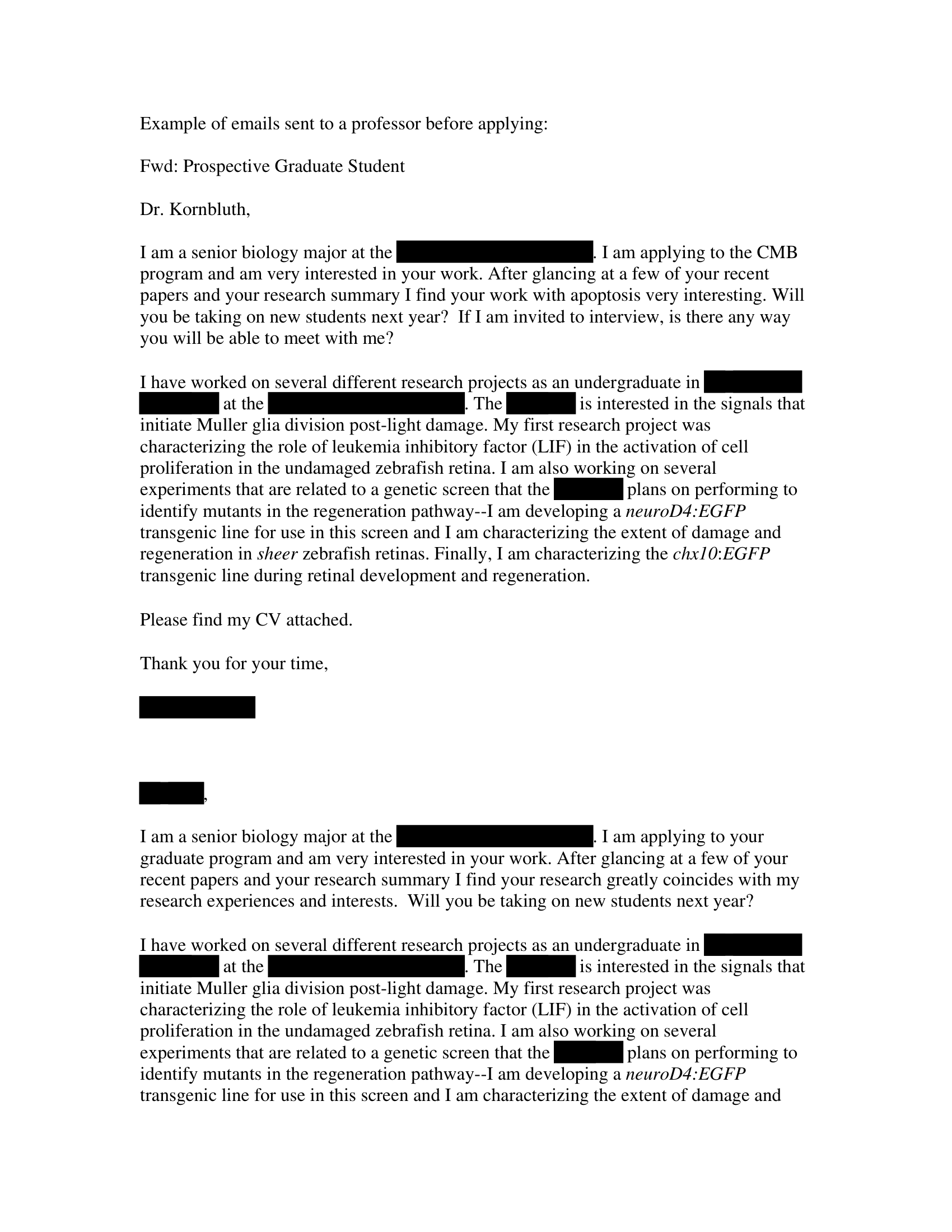
It seems that the LLM followed all the instructions. There are no redaction boxes visible for Dr Kornbluth, all references to Dr Hyde and Lauren Lilley have been redacted, and no University name is visible.
Overall score: 10/10
Page 2 is very short, and there are no problems there either. On this simple example, the Qwen model gets 10/10. Very little time would be needed for a human operator to review these outputs.
2. A seven page document with scanned pages and signatures
The next document is much more challenging. The Partnership Agreement Toolkit document contains signatures to identify, and several pages that were scanned in, requiring the use of OCR rather than simple PDF text extraction. I gave the agent the following custom instructions:
- All signatures should be redacted
- Any redaction box related to general country names should be removed
- All redactions for Rudy Giuliani should be removed
- All mentions of London, and 'Sister City' should be redacted
Below I will highlight a few pages where the Qwen model did well and seemed to struggle to follow the rules.
Page 1
This is a relatively easy page where most text can simply extracted, with a couple of images of text at the top.
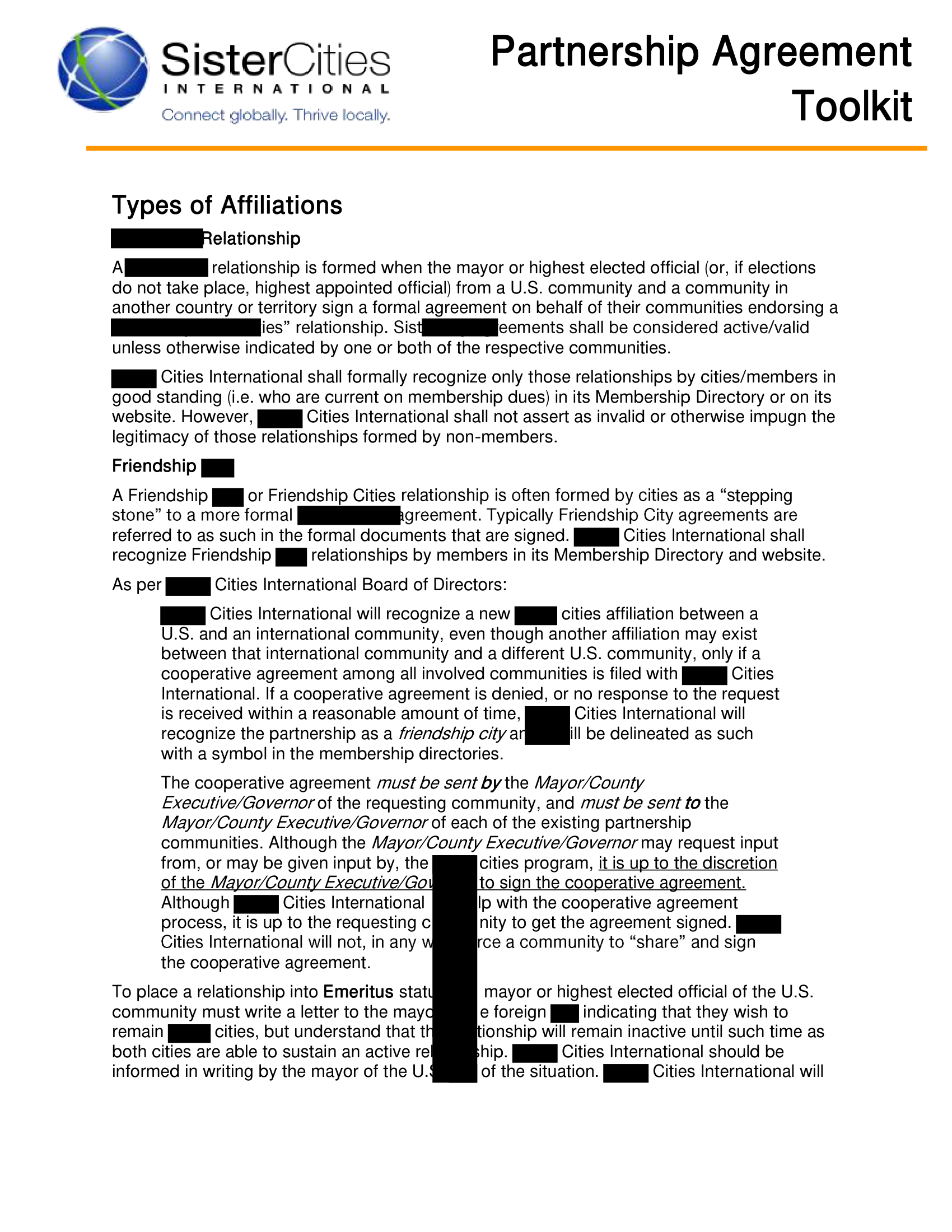
The agent performed mostly well. Sister city references are removed. The missed ‘SisterCities’ image version in the top left, which is picked up by OCR as a single word, can probably be given a pass as this exact term is not specified in the instructions. One big miss is that a large column-like redaction box is visible in the middle of the page, something that you would hope the agent would be able to pick up on during its checks. 8/10 for this page.
Page 4
This is a page with a scanned image of a document. There are signatures, mentions of countries, and ‘Sister city’ mentions.
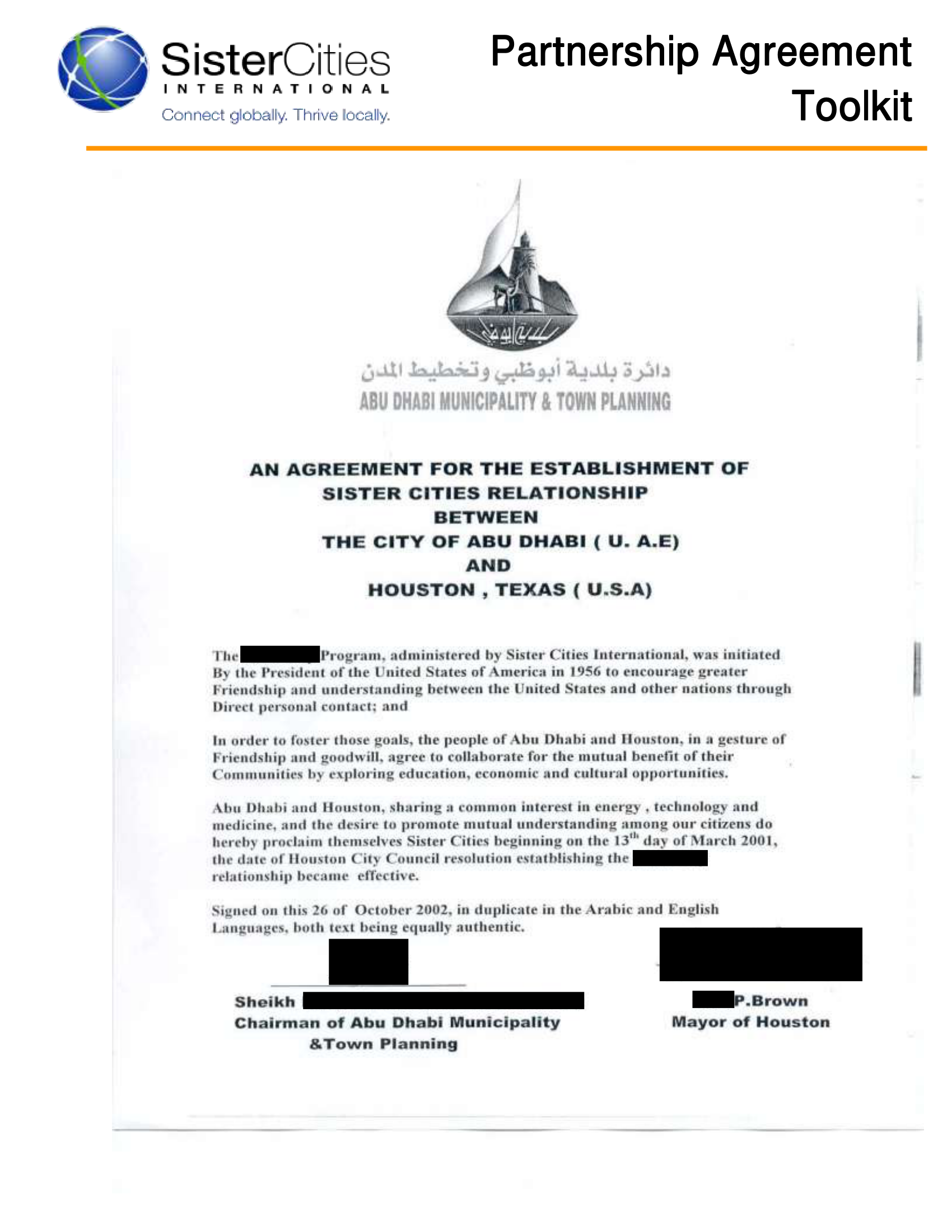
We can see that the agent successfully redacted the signatures. However, it has missed the country names. Looking at the summary markdown produced by the model, it says ‘Reviewed all proposed boxes — no general country names were flagged for redaction by the PII model.’. This suggests to me that it trusted the initial automated redaction process to remove all countries, without doing a proper check of the text afterwards to ensure that no country names were retained by error. This could be the model getting confused or by error.
7/10 for this page.
Page 5
This page is similar to page 4 with a scanned page and signatures. It has a few London mentions, and also Rudy Giuliani’s name is present a couple of times, both mentioned in the specific user instructions.
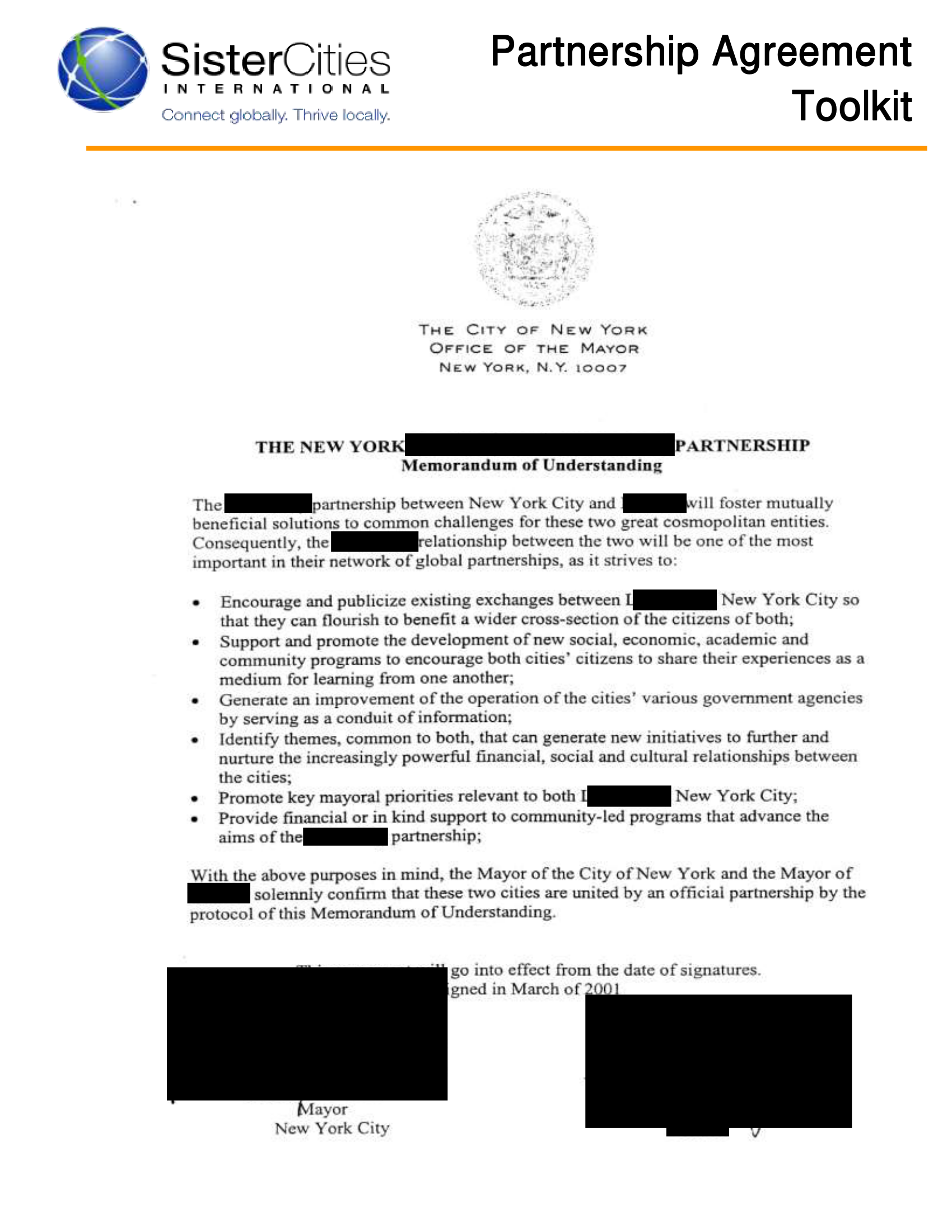
Again, the model successfully redacted the signatures. It also correctly redacted the London mentions, but also redacted Rudy Giuliani’s name, which I asked to be excluded.
Again, 7/10 for this page.
Overall
My feeling is that Qwen 3.6 27B performed pretty well with this document, but completely missed a couple of specified rules, namely redacting country names, and leaving Rudy Giuliani’s name unredacted.
Overall score: 7.5/10
A human reviewer would need to spend some time fixing the mistakes and omissions made by the model, probably about 10 minutes, compared to 20-30 minutes to do the whole task manually.
3. A 22-page policy document for residents
The final document to test is a 22-page policy document for residents with many references to places, names, and faces to redact throughout. I gave the agent the following custom instructions:
- Redact any terms related to Lambeth, and Lambeth 2030
- Redact any names
- Redact any photos of faces
This document consists mostly of extractable text, but the presence of many images means that the model will need to use OCR to identify which contains photos of faces. As several pages have many photos on them, this will be a good test of the consistency of the model in terms of redacting each and every instance it comes across. The final redacted output is here - below I will highlight a few pages so you can get an idea of general performance.
Page 3
This first page is mostly typed text, with a couple of photos of faces, and a drawing of a person.
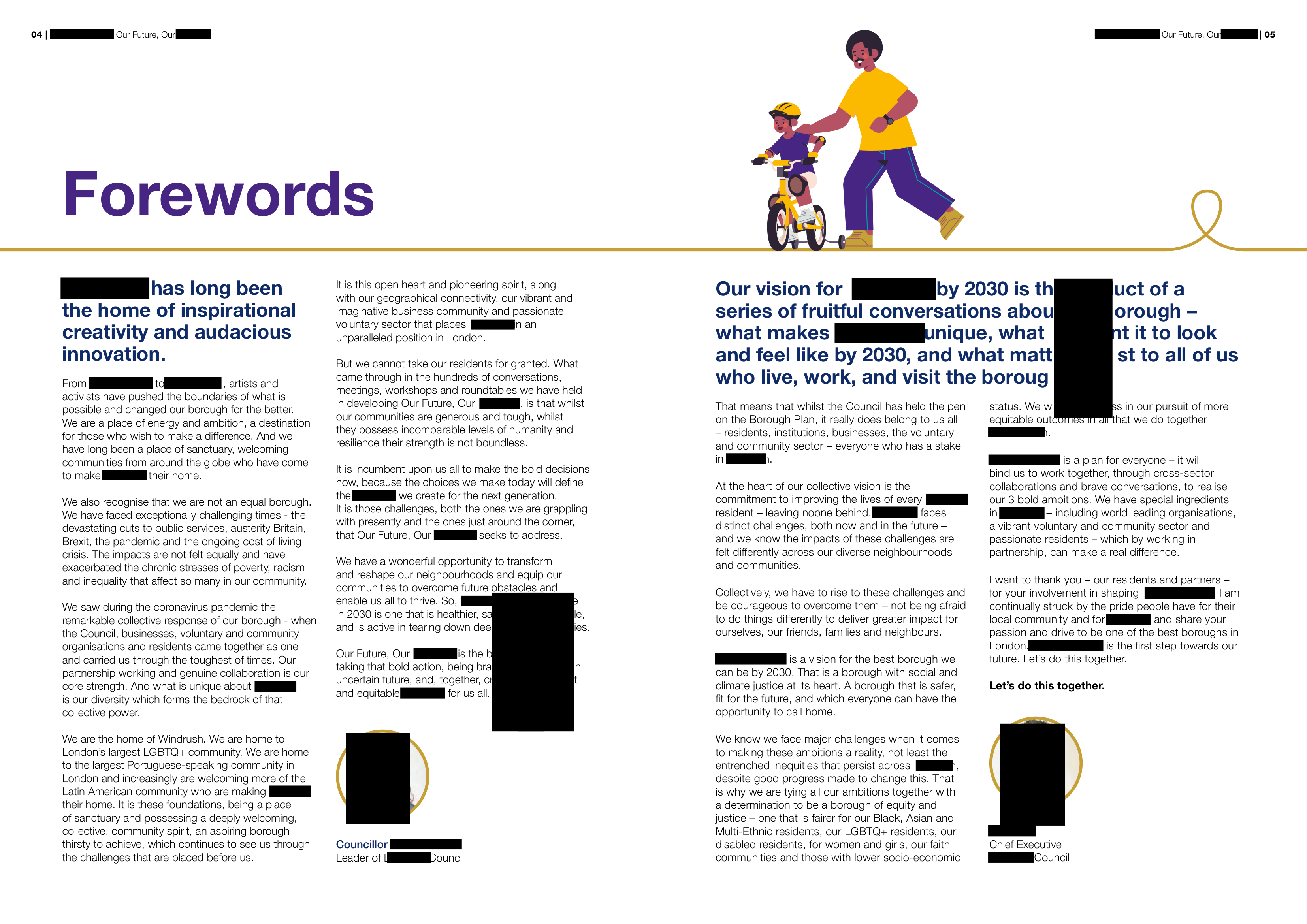
On this first example, the model has done quite well. All references to Lambeth have been redacted, and I can’t see any visible names or photos of faces. The cartoon style face near the top of the image has been correctly ignored. However, there are a couple of large, column-like redaction boxes that are strangely positioned in the middle of the text, indicating redaction boxes that went wrong but were not picked up by the model. 8/10 overall for the page.
Page 5
This page is similar to page 3, but with many more photos of faces, and less text.
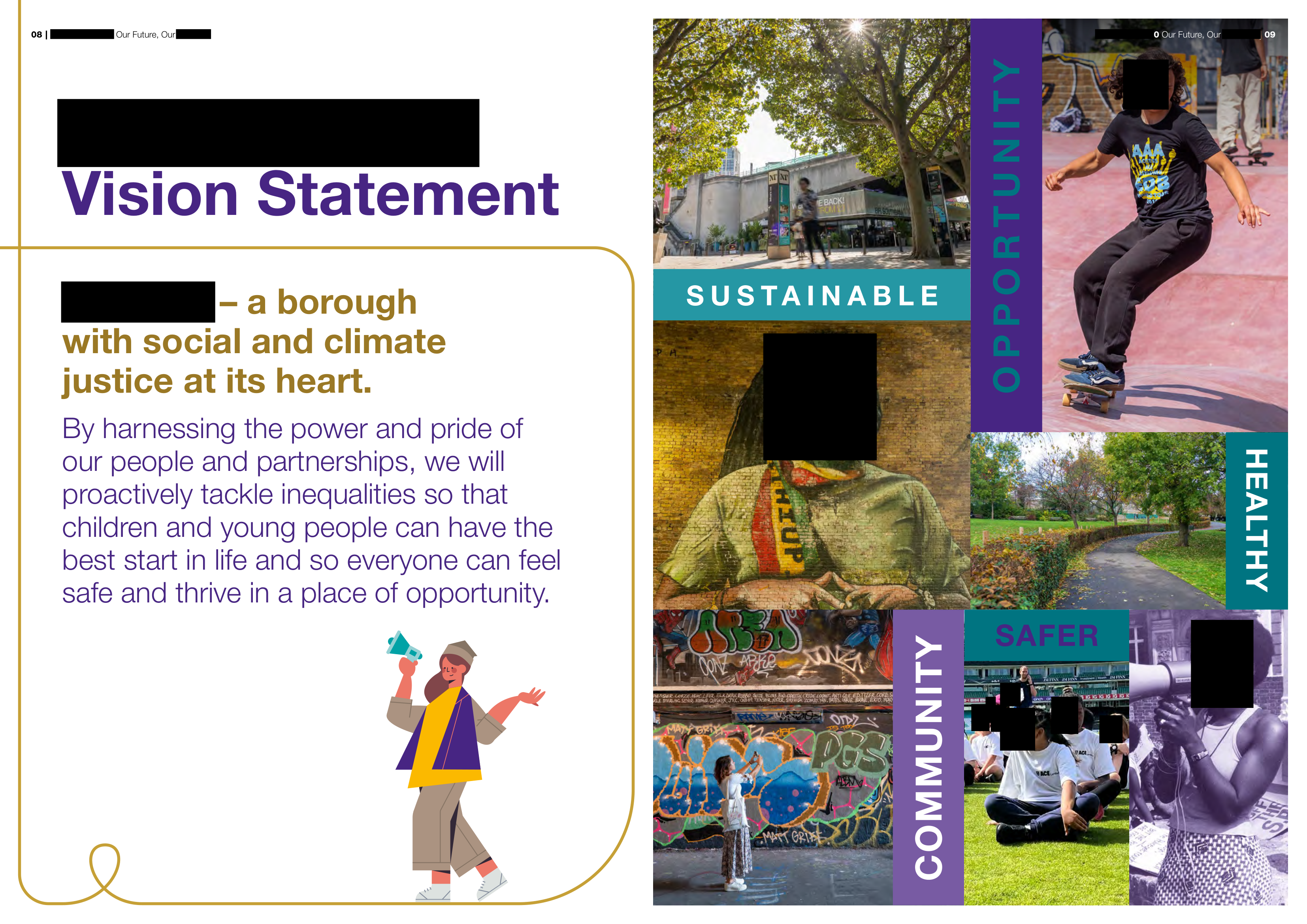
The model has done well on this page. It correctly redacted at least 8 instances of photos of (identifiable) faces, and correctly ignored the drawings of faces. 10/10 here.
Page 18
Again a page with a number of photos of faces, but now with lots of text also
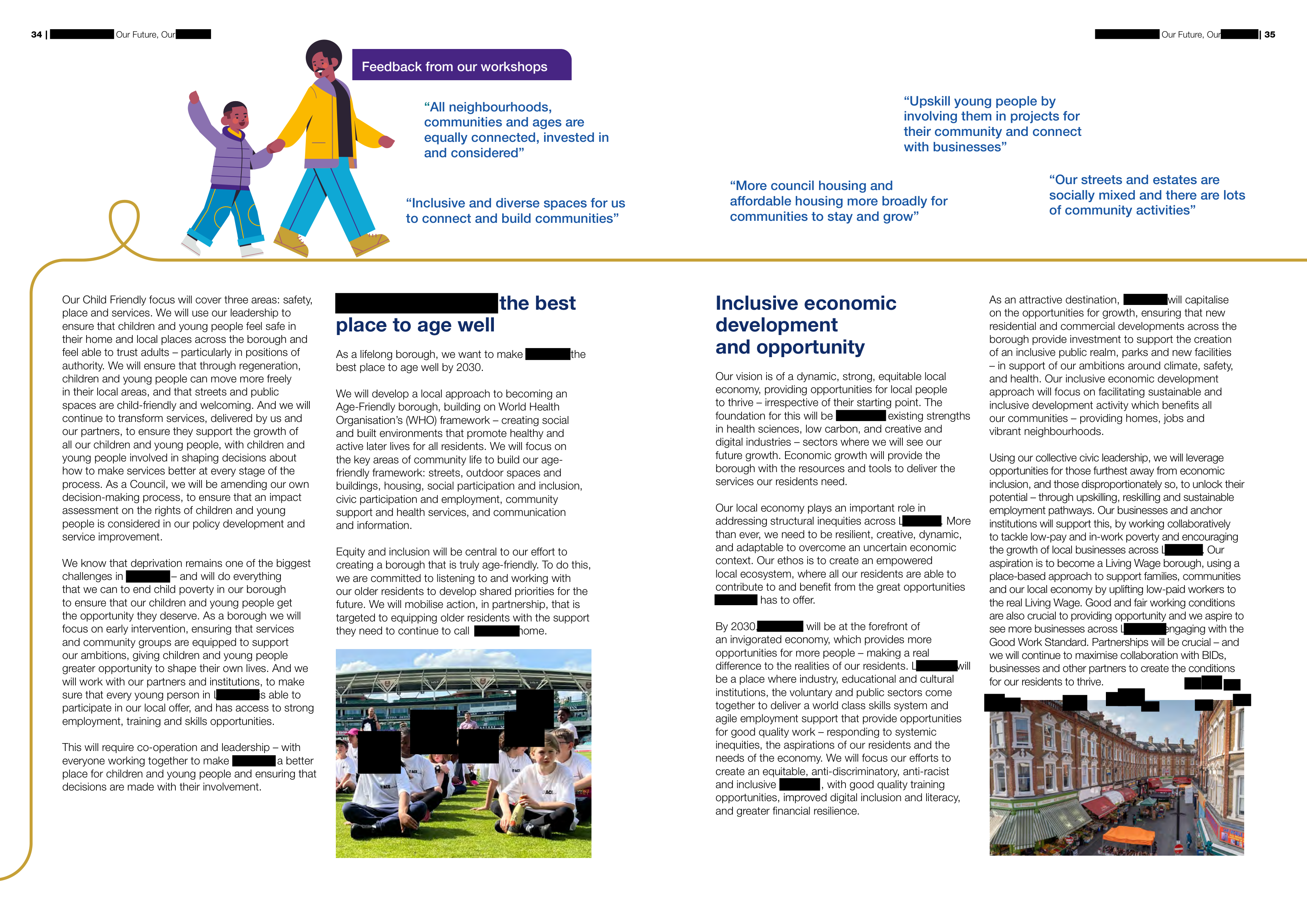
The text redaction is generally ok (with some ’L’s from Lambeth visible), but with a strange cluster of tiny redactions on the right side of the page that the agent did not pick up on. The agent redacted most faces, but missed some in the cluster towards the bottom. Pretty good, but I can’t give more than 7.5/10 due to these misses.
Overall
The rest of the document paints a similar picture - most faces (but not all) correctly redacted, then some small errors here and there throughout the document that the agent does not correct. The agent itself acknowledges that human review is needed, and it did not do a page-by-page visual review of the document - perhaps a number of the issues shown here could be resolved with follow up questions to ask the agent to fix the issues we see (beyond the scope of my experiment here).
Overall score: 8/10
I think that redacting this document manually would take about 20 minutes using the Document Redaction App manually. Using the agentic approach, I think this would reduce to about 10 minutes, but still some checking and fixing would be needed for the oddly sized redaction boxes and missed faces throughout.
Conclusion
| Document | Score |
|---|---|
| 1. Examples of emails sent to a professor before applying | 10/10 |
| 2. Partnership Agreement Toolkit | 7.5/10 |
| 3. Lambeth 2030 policy document | 8/10 |
Overall, the Qwen 3.6 27B model in a Pi agent harness performed well to redact the test documents with specific (sometimes unusual) user instructions. But it did not get everything right. Sometimes it ignored instructions. Sometimes it followed the instructions, but made errors, and did not check them. Sometimes it expected a follow up prompt to specifically ask it to resolve the issues it knew remained. But despite these issues, the model correctly did about 80-90% of the redactions correctly throughout the test documents, including scanned pages, and redacting signatures or photos of faces.
I think that using Qwen 3.6 27B in a local agentic system, along with follow up human review using the Document Redaction App GUI, could save significant time in redacting short to mid-length documents. I would say the Redaction app alone saves at least 60% of overall time, and the agentic system could save another ~20% of time, especially if follow up questions were used to prompt the agent to fix remaining issues. This system has the added benefits of running completely locally (potentially more secure for sensitive documents), and avoiding API costs. After about 50 pages with complex documents and instructions, I imagine inference speed and context window limitations could be a barrier to effective use with local systems.
As local models improve in performance, I will continue to test them for redaction tasks to get a measure of progress. At this rate, I can imagine that within a couple of years, most document redaction tasks could be effectively performed by a local agentic system, with little time for human review needed afterwards.