OCR and redaction with Qwen 3.5
March 2026
Overview
The ‘doc_redaction’ project is an open source GUI and CLI application for OCR and redaction tasks for PDF documents, images, and tabular data. The code for the application can be found here. Initially the app was based on ‘traditional’ OCR such as Tesseract and PaddleOCR, with spaCy for entity recognition, alongside API calls to AWS services such as Textract and Comprehend.
Recently the app has incorporated local vision language models (VLMs) for OCR and redaction tasks with on-device deployment. The particular difficulty of the document redaction task compared to most OCR uses is that the specific bounding box location of words is essential for successful redaction, meaning that until now, VLMs have struggled to be useful in this context. Improvements in the past year in both closed and open source VLM models have changed the situation.
In February 2026, I wrote an article looking into the use of VLMs for OCR and redaction tasks in documents. The original article, using Qwen 3 VL 8B Instruct, can be found here. In late February 2026, Qwen 3.5 was released and I wanted to see how it compared to Qwen 3 for OCR/redaction tasks. Here I will test Qwen 3.5 for OCR/redaction on three ‘difficult’ tasks with an updated version of the app (version 2.0.1, which you can test out for yourself here).
We will be trying the models with the following tasks:
- OCR of a difficult handwritten note
- Face detection (with bounding box locations) on a document page
- Custom entity identification on open text (using LLMs)
My conclusion from the previous article was that PaddleOCR for initial OCR, paired with Qwen 3 VL 8B Instruct for low confidence phrases was the best solution for OCR of ‘difficult’ pages in documents (e.g. with difficult handwriting). In this post, I will use the following models (along with instructions on how you can try them yourself):
- Qwen 3.5 9b 4 bit quantised, deployed via vLLM.
- Qwen 3.5 35B A3B 4 bit quantised, deployed via llama.cpp.
- Qwen 3.5 27B 4 bit quantised, hosted on the Document Redaction VLM space on Hugging Face here. You can try this model directly with the examples below at this URL without deploying your own server.
Deploying Qwen 3.5 35B A3B 4 bit quantised (llama.cpp)
- For llama.cpp, use the Docker Compose file in the main doc_redaction repository here. Use command ‘docker compose -f docker-compose_llama.yml –profile 27b up -d’. Recommended VRAM is 24GB, but can be adjusted downwards with the ‘–n-gpu-layers’ or ‘–n-cpu-moe’ parameters (as relevant)in the docker compose file. See the Unsloth guide to Qwen 3.5 deployment for more details.
Deploying Qwen 3.5 9B 4 bit quantised (vLLM)
Deploy with the docker compose file here. Use command ‘docker compose -f docker-compose_vllm.yml –profile vllm-9b up -d’, needs 16-17GB GB VRAM. Further instructions for use of vLLM can be found here. For less VRAM usage, you can deploy the 9B model also using an Unsloth GGUF file, similar to the approach for the 35B model above.
Example 1: Difficult handwritten note
To try the Qwen 3.5 27B model with this example, at the Hugging Face space, click the third example name, ‘Unclear text on handwritten note’, change the local OCR model option below to ‘vlm’. Then click on ‘Redact document’.
The first example is a note with handwriting that is hard to decipher even for a person.
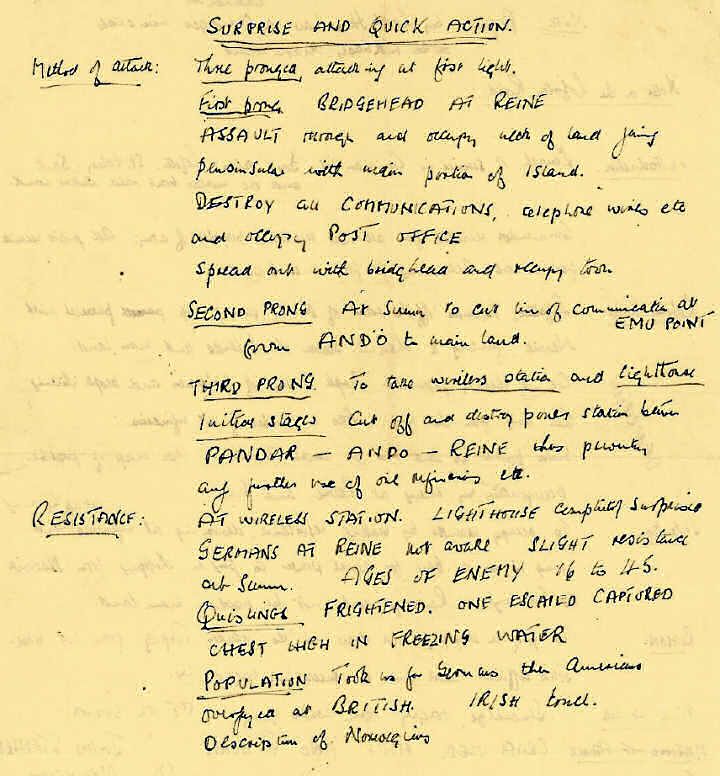
Qwen 3 VL 8B Instruct
Qwen 3 VL 8B Instruct alone
As a reminder, Qwen 3 VL 8B Instruct alone found this:
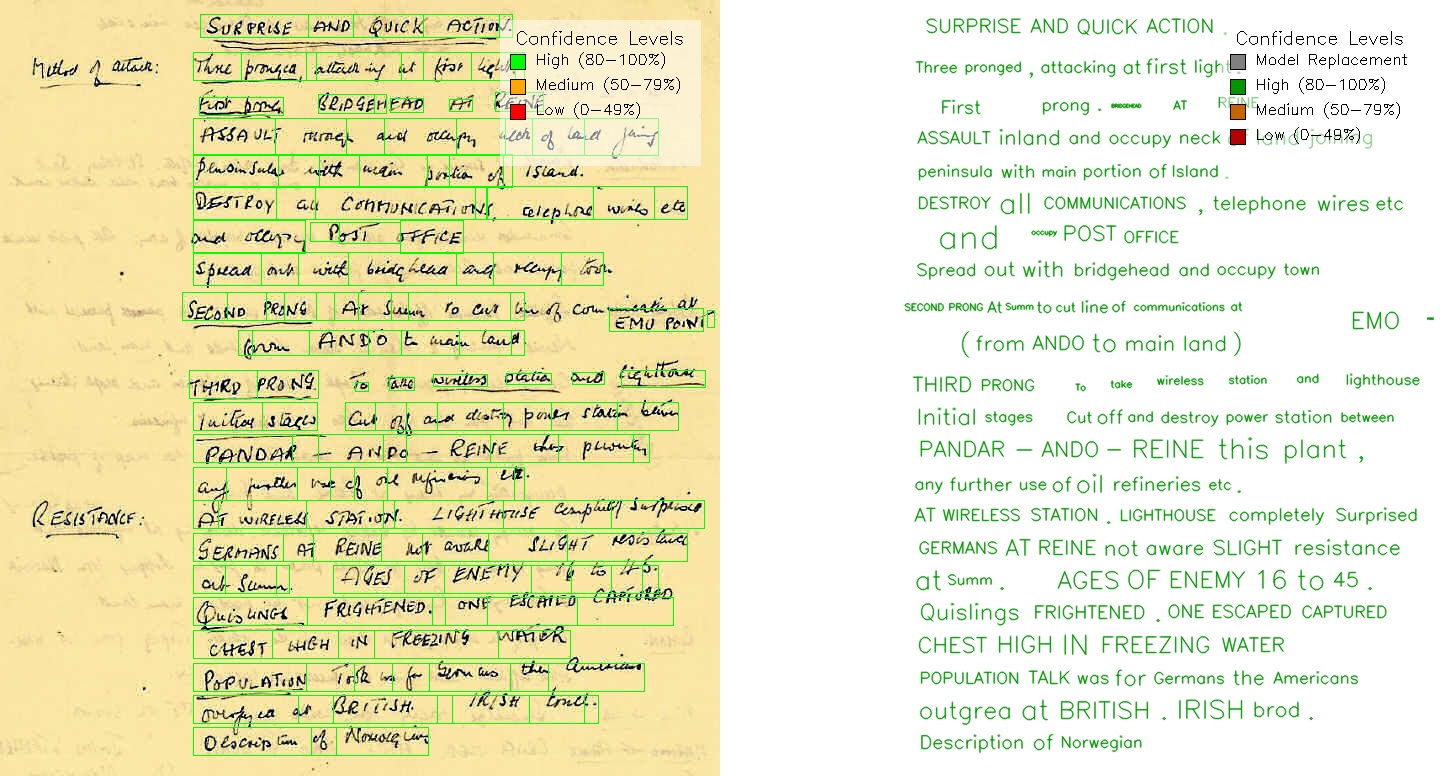
Rating: 7/10 - the text identification is pretty good, but the model ignored the two text lines on the left (7/10). Bounding boxes are generally accurate, but some do not cover the entire line (7/10).
Hybrid PaddleOCR + Qwen 3 VL
A hybrid approach of PaddleOCR + Qwen 3 VL 8B Instruct found this:

Rating: 7.75/10 - the text identification is a bit worse than the VLM model alone (7.5/10). This is improved by the fact that due to the hybrid approach, all the bounding boxes have been identified, and the text is generally correctly (8/10).
My conclusion from the last article was that PaddleOCR for initial OCR, paired with Qwen 3 VL 8B Instruct for low confidence phrases was the best solution for ‘difficult’ pages in documents. This was mainly due to the ‘laziness’ of the VLM model to identify text in the document - note that Qwen 3 VL 8B Instruct ignored the two text lines on the left. On pages with lots of text, I find that this pattern is repeated - the VLM will tend to miss some text.
Qwen 3.5 9B (vLLM)
VLM alone
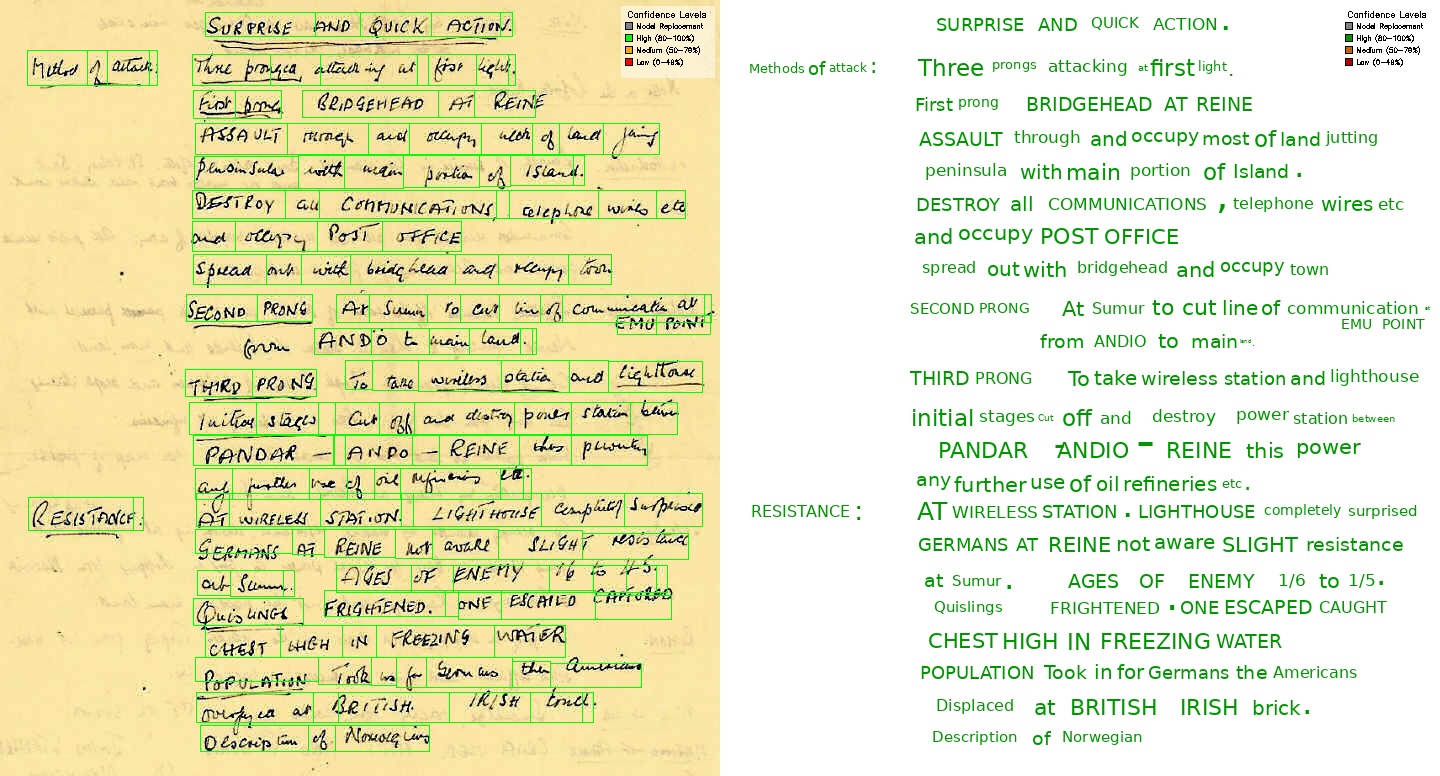
Rating: 8/10 - the text identification is generally good, and it has included the two text lines on the left that were missed by Qwen 3 VL 8B Instruct, however and the text is not fully correct (8/10). For bounding boxes, it did miss one text box in the middle of the page (8/10).
Hybrid PaddleOCR + Qwen 3.5 9B
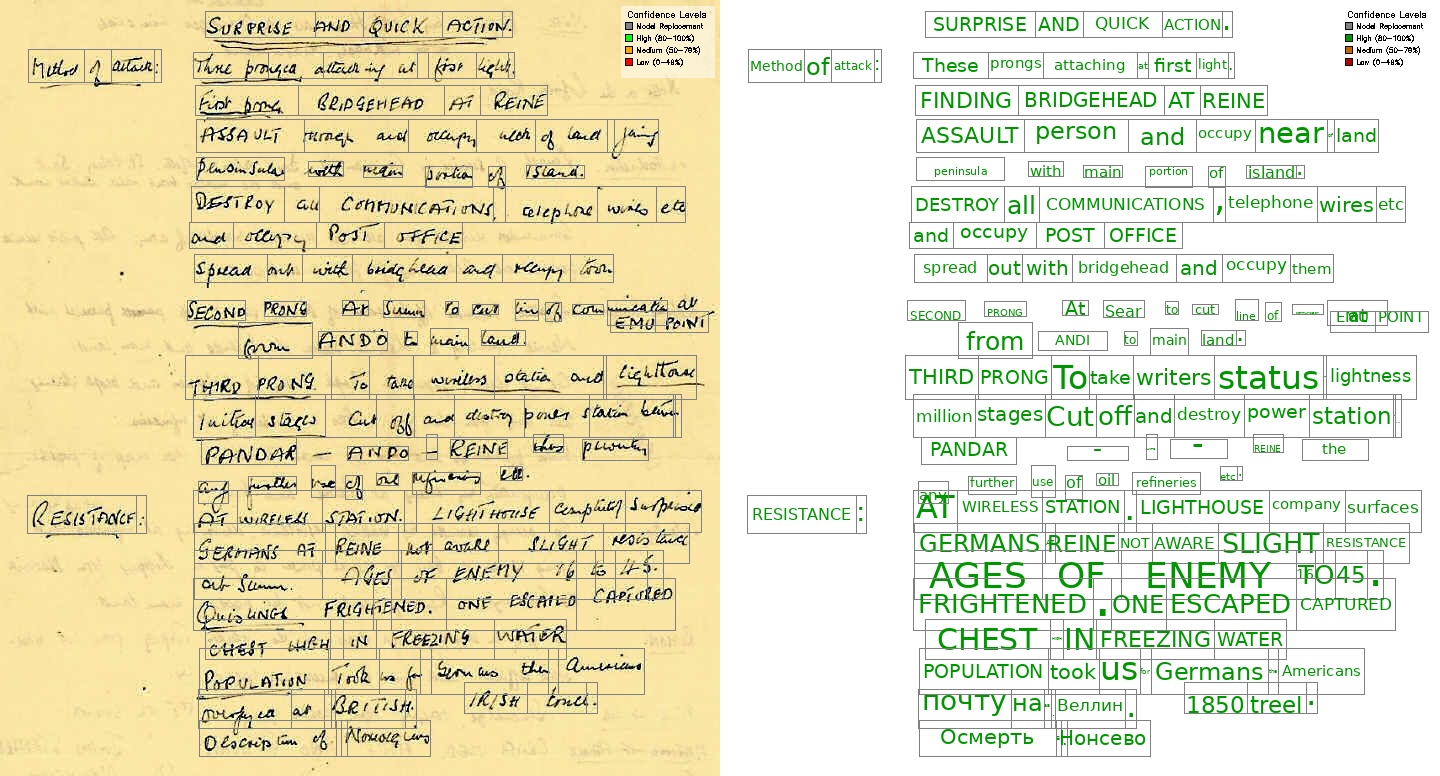
Rating: 7.75/10 - The bounding boxes are all located correctly (8/10), but the text identification is not that great - particularly noting the Cyrillic characters identified near the bottom of the page (7.5/10).
Qwen 3.5 35B A3B (llama.cpp)
VLM alone
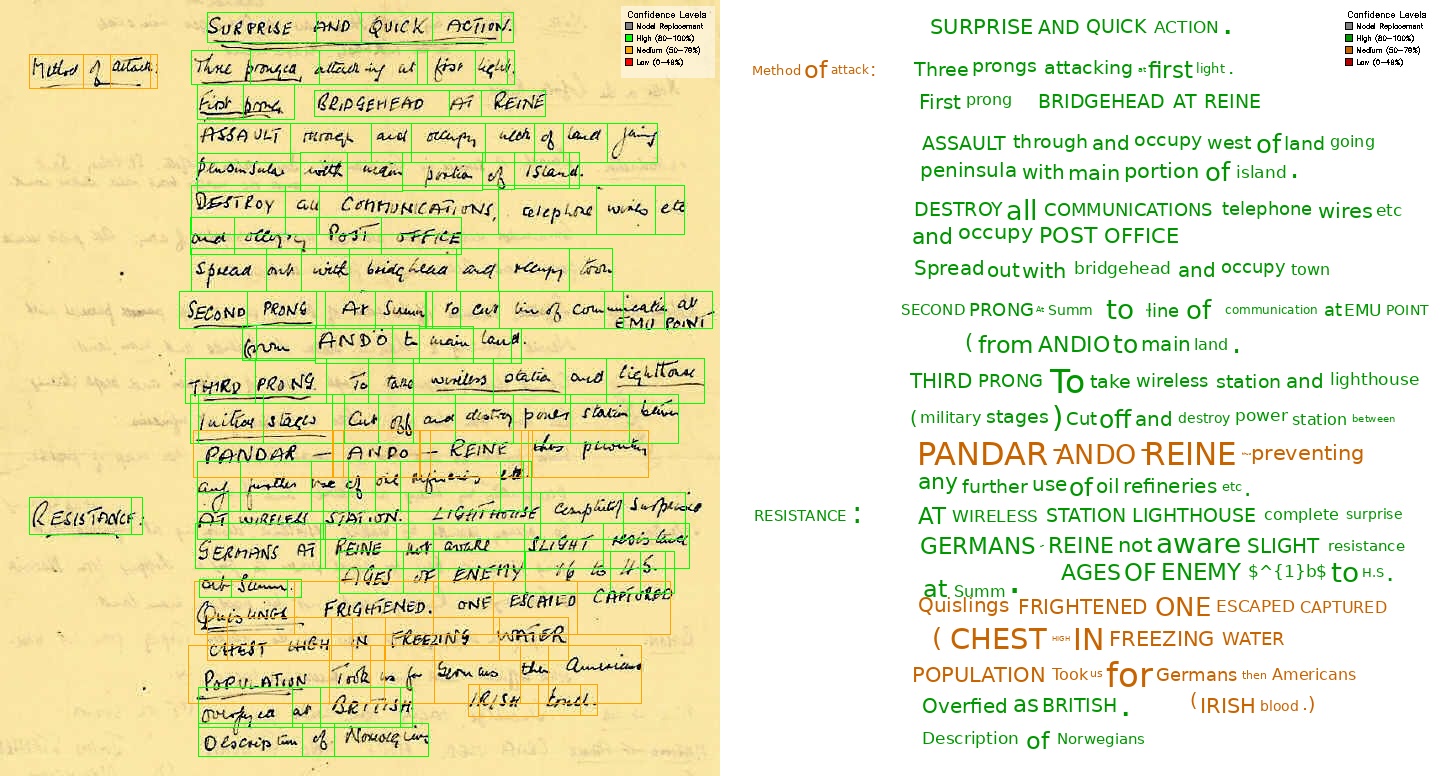
Rating: 8/10 - the text identification is generally good, but I would say it slightly worse than the 9B model (8/10). No text boxes have been missed, however some boxes seem too large and overlap their neighbours (8/10).
Hybrid PaddleOCR + Qwen 3.5 35B A3B
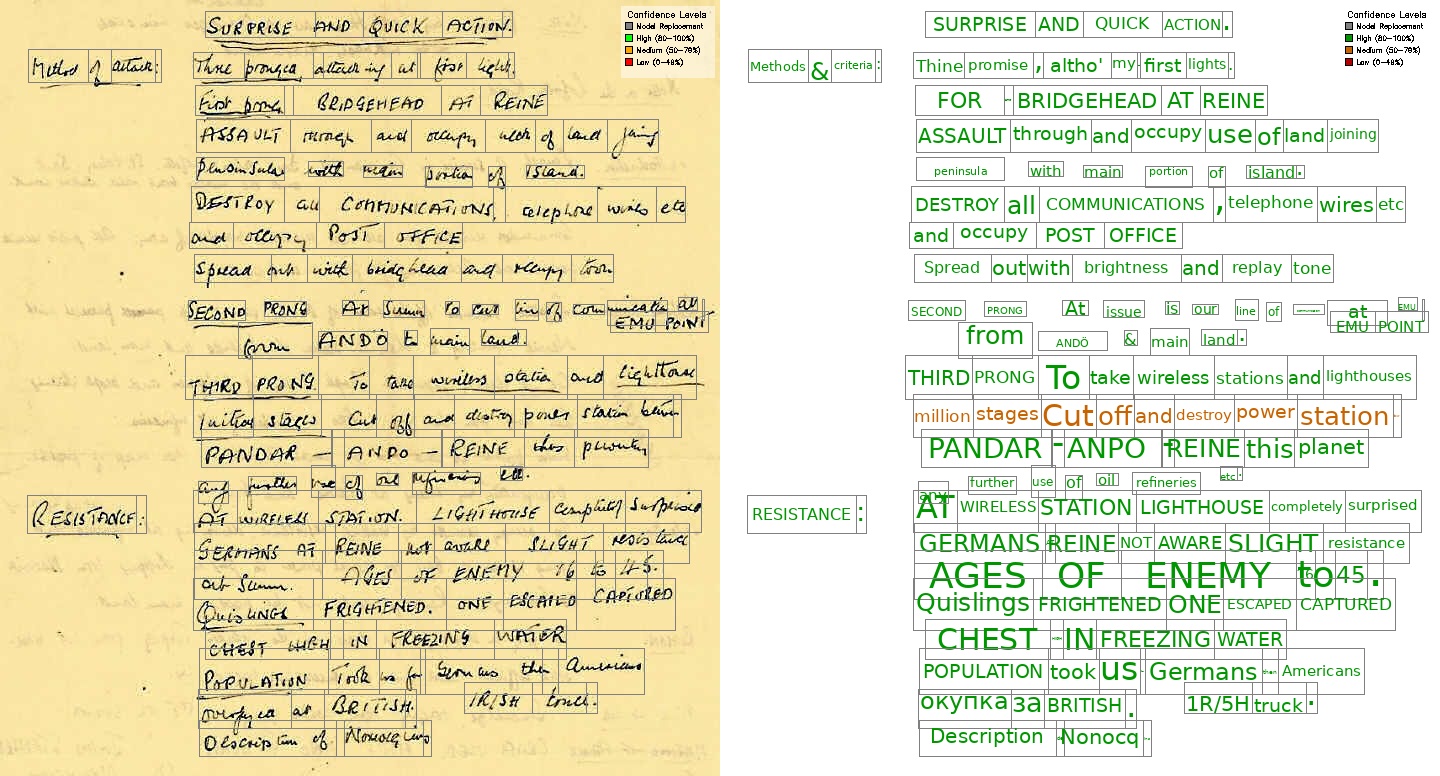
Rating: 8.25/10 - The text identification is slightly better than for the 9B model in the hybrid approach, but still not perfect (particularly near the bottom) (8/10). The improvement in text identification results also in a better word match to bounding boxes (8.5/10).
Qwen 3.5 27B (HF space)
Qwen 3.5 is served on the Hugging Face space here. Click the third example name, ‘Unclear text on handwritten note’, change the local OCR model option below to ‘vlm’. Then click on ‘Redact document’.
VLM alone
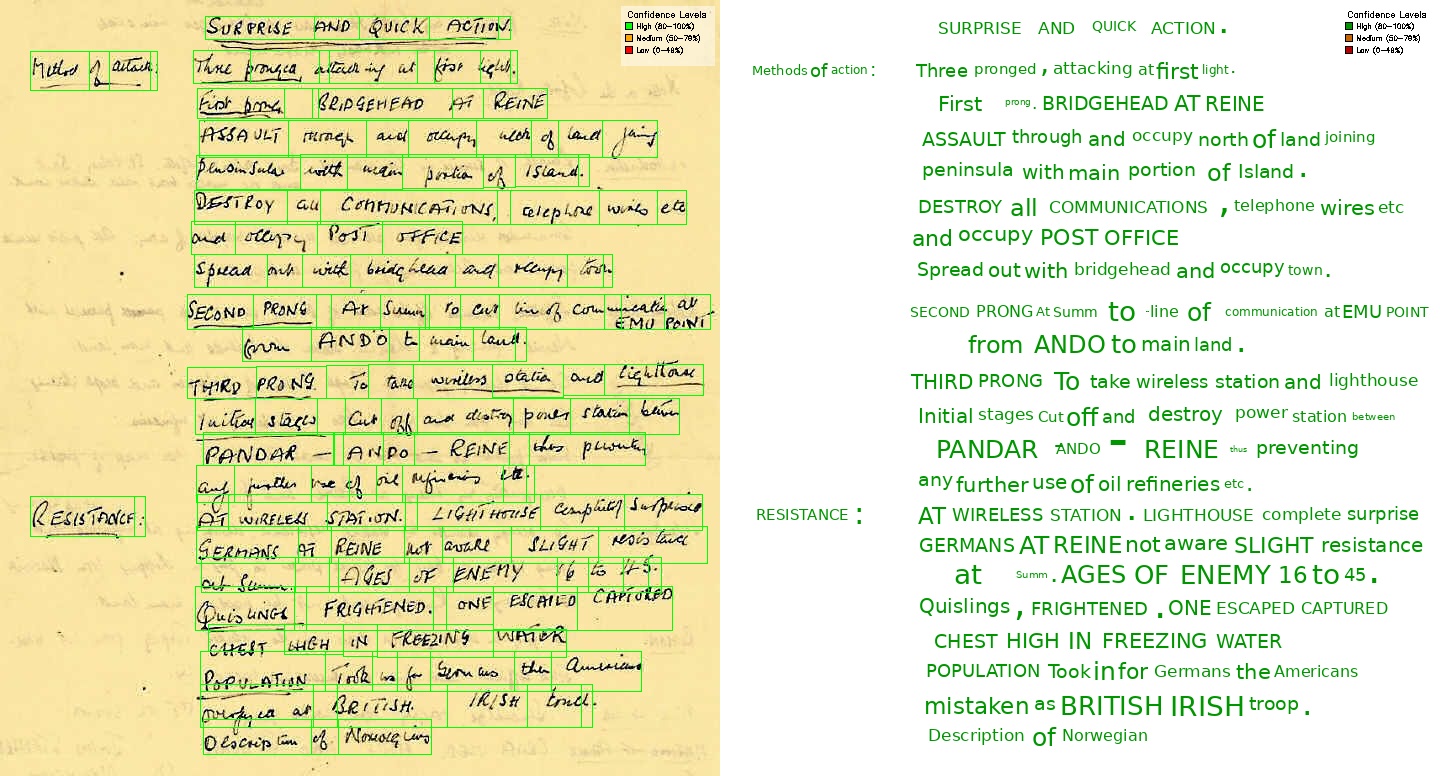
Rating: 8.5/10 - The output as generally very good. This time, the VLM model has identified all the text in the document (8.5/10). The position of the bounding boxes are also generally correct, with less overlap between lines than seen with the 35B A3B model (8.5/10). I have not given a higher score as I have seen with other quants (namely the llama.cpp deployment of the model that you can run here), the model does seem to miss a line or two of text. The unreliability/laziness of the model is still an issue.
Hybrid PaddleOCR + Qwen 3.5 27B
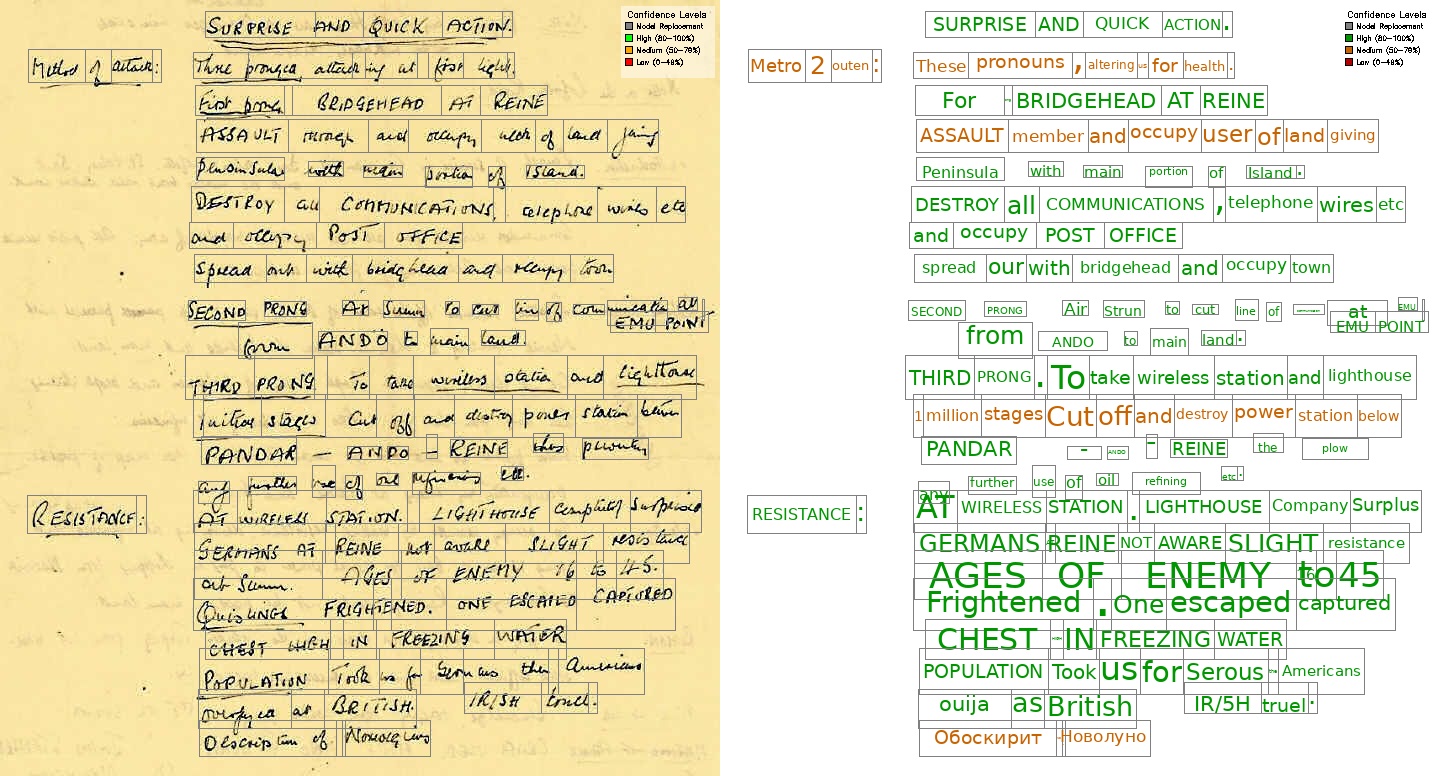
Rating: 7.75/10 - The text identification is noticeably worse than using the VLM alone (Cyrillic characters identified near the bottom) (7.5/10). The bounding boxes are also generally worse, with more overlap between lines than seen with the VLM alone, and some very small word boxes are present (8/10).
Conclusion
| Model | Text Identification | Bounding Boxes | Overall rating |
|---|---|---|---|
| Qwen 3 VL 8B Instruct | 7/10 | 7/10 | 7/10 |
| Hybrid PaddleOCR + Qwen 3 VL | 7.5/10 | 8/10 | 7.75/10 |
| Qwen 3.5 9B | 8/10 | 8/10 | 8/10 |
| Hybrid PaddleOCR + Qwen 3.5 9B | 7.5/10 | 8/10 | 7.75/10 |
| Qwen 3.5 35B A3B | 8/10 | 8/10 | 8/10 |
| Hybrid PaddleOCR + Qwen 3.5 35B A3B | 8/10 | 8.5/10 | 8.25/10 |
| Qwen 3.5 27B | 8.5/10 | 8.5/10 | 8.5/10 |
| Hybrid PaddleOCR + Qwen 3.5 27B | 7.5/10 | 8/10 | 7.75/10 |
Overall, the Qwen 3.5 27B model alone (i.e. not using the hybrid approach with PaddleOCR) performs best on this task for identifying difficult handwriting. However, the issue with model ‘laziness’ in terms of missing lines of text in its response still persists, preventing me giving it a near perfect score.
Example 2: Face identification
The next task is to accurately identify the location of people’s faces on a document. The document can be found here.
Since the pages contain a lot of typed text, pure VLM analysis is not necessary, and would likely worse due to the general VLM ‘laziness’ in terms of missing lines of text in their response. So page OCR is conducted with a hybrid PaddleOCR + VLM model approach (for any low confidence lines). Afterwards, a second VLM pass looks specifically for photos of people’s faces present on the page, and creates a bounding box for each face.
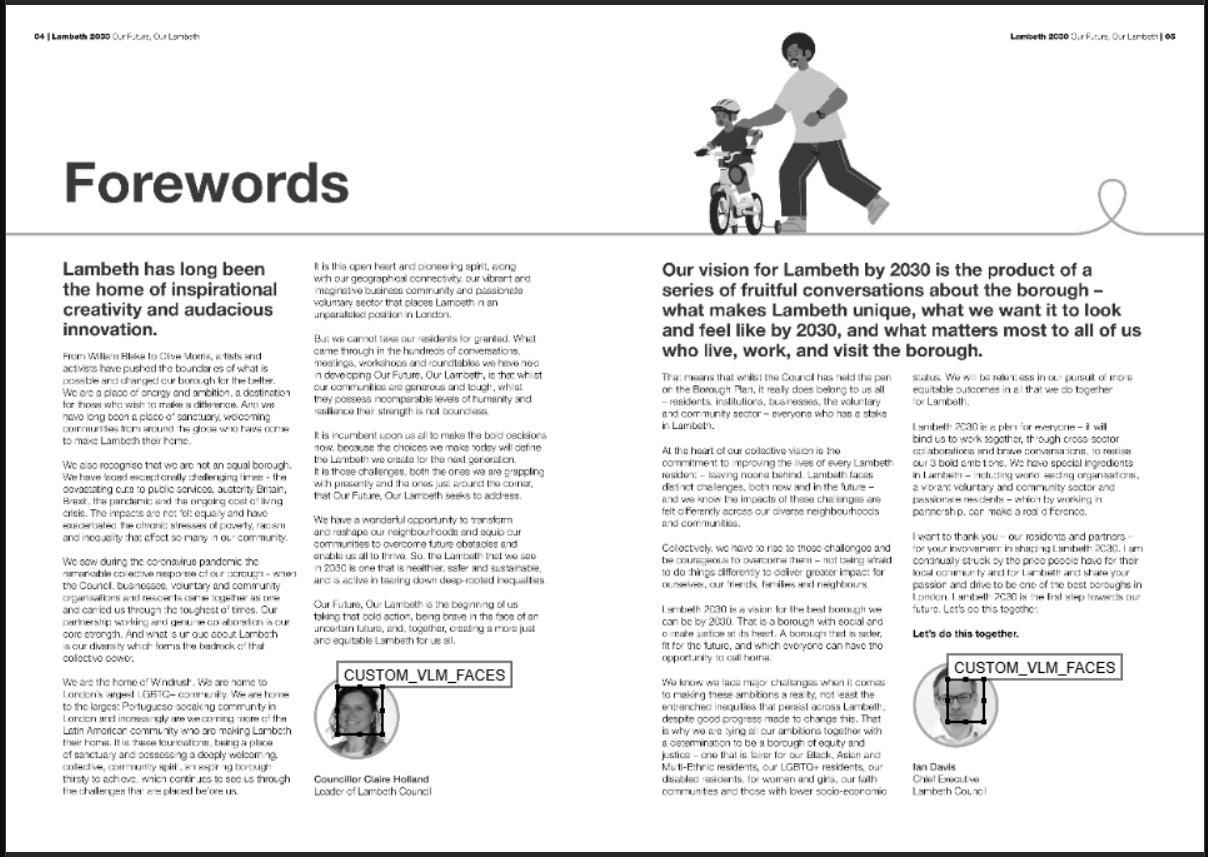
The example page contains two photos of faces, one on the left side of the page, and one on the right side, and also two cartoon drawings of peoples. So this test also tests the VLM’s ability to following instructions to distinguish between photos of faces and cartoon drawings, as well as locating them.
Qwen 3 VL 8B Instruct
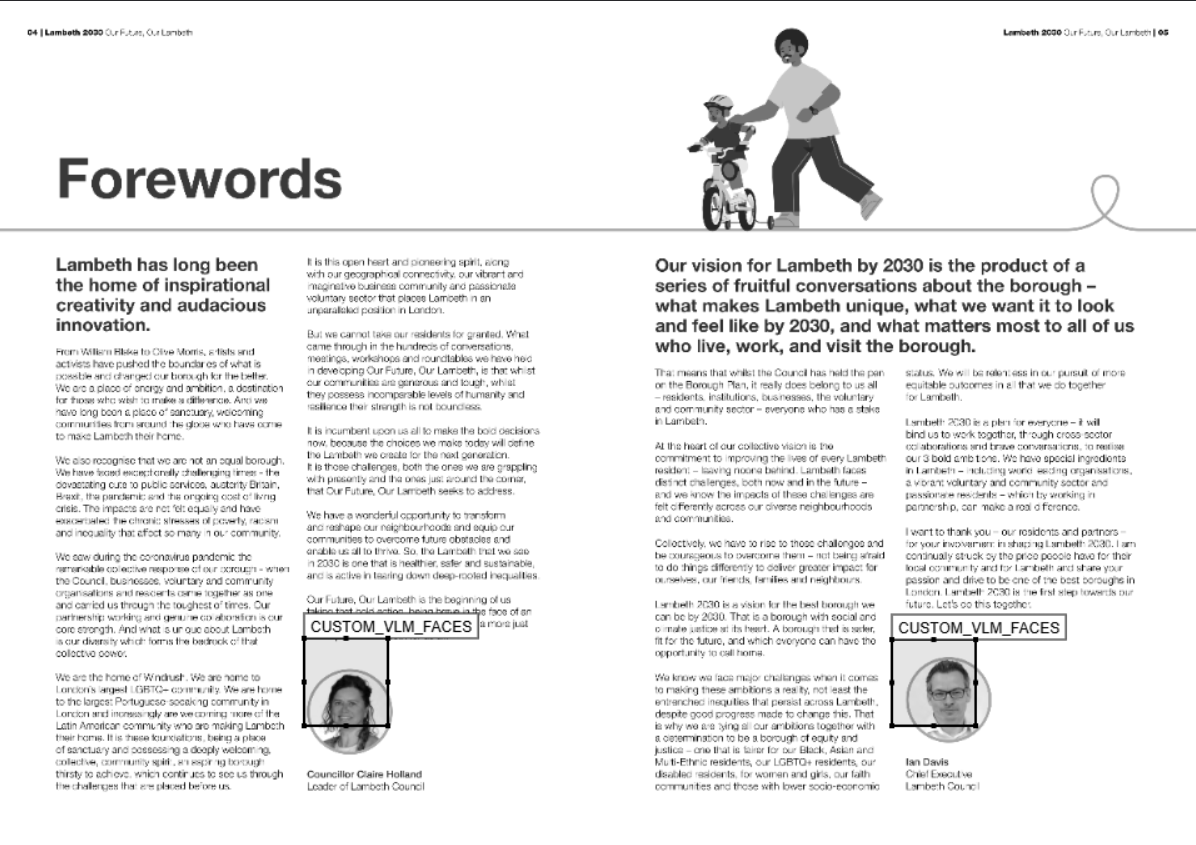
Rating: 7/10 - Qwen 3 VL 8B Instruct identified the faces and covered them, but the bounding boxes are not perfect - they are extended quite a bit upwards from the face location.
Qwen 3.5 9B (vLLM)
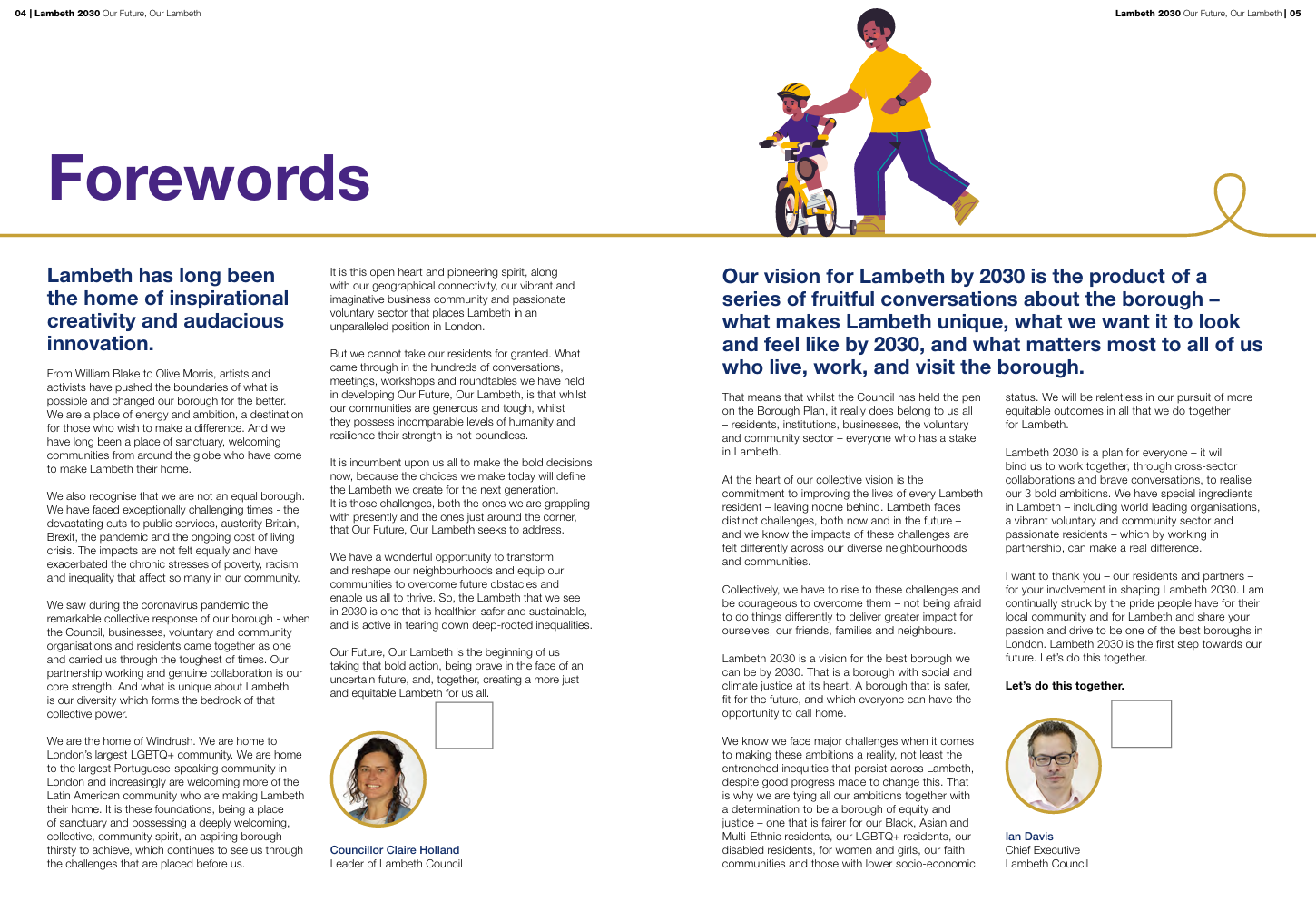
Rating: 5/10 - Qwen 3.5 9B identified that there were two photos of faces on the page, but missed both faces completely with the bounding boxes. Disappointingly, this is much worse than the earlier Qwen 3 VL 8B Instruct model.
Qwen 3.5 35B A3B (llama.cpp)
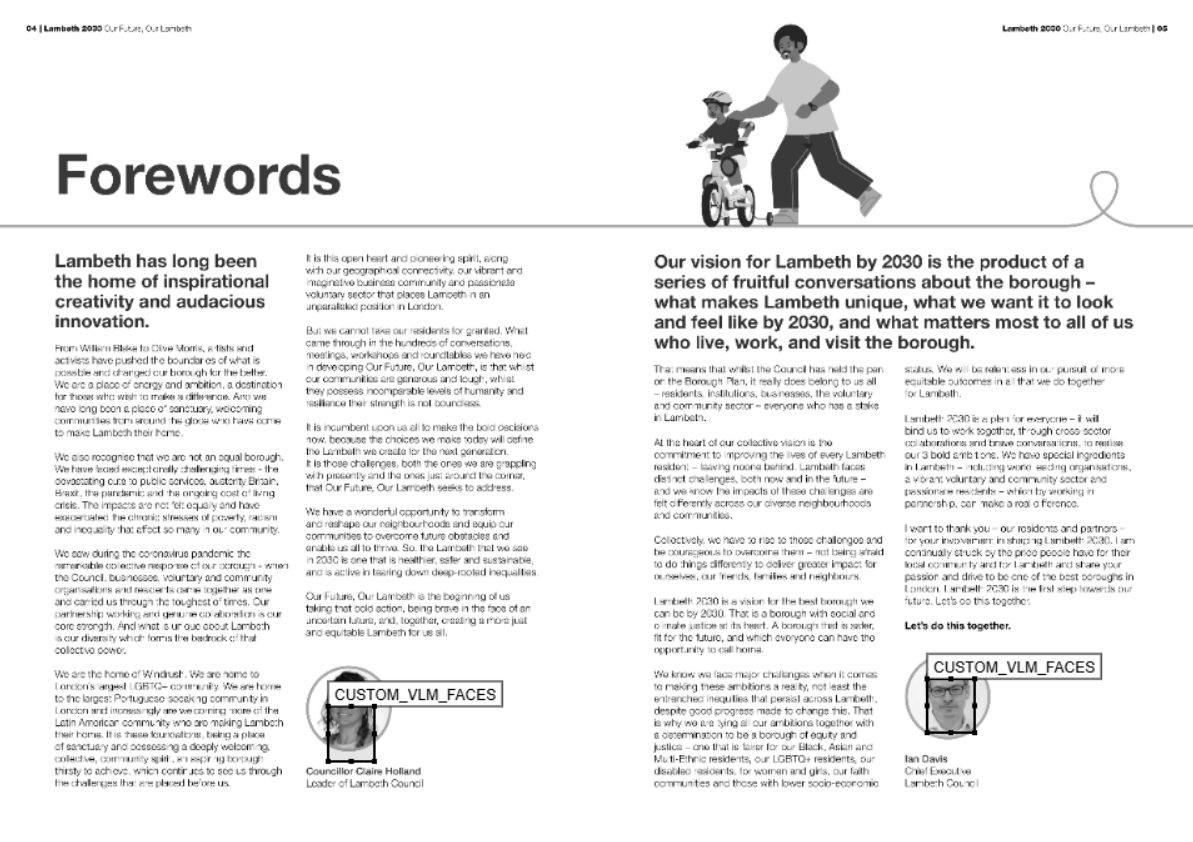
Rating: 7/10 - Qwen 3.5 35B A3B identified the faces and located them roughly in the correct position. However, on the face on the left, the eyes are still visible, so it cannot count as a full redaction.
Qwen 3.5 27B (Hugging Face space)
Qwen 3.5 is served on the Hugging Face space here. Upload the ‘Lambeth 30 FINAL ACC Ver Dec.pdf’ file linked above. change the local OCR model option below to ‘hybrid-paddle-vlm’, and in the entities list below, ensure that ‘CUSTOM_VLM_FACES’ is part of the list. Then click on ‘Redact document’.
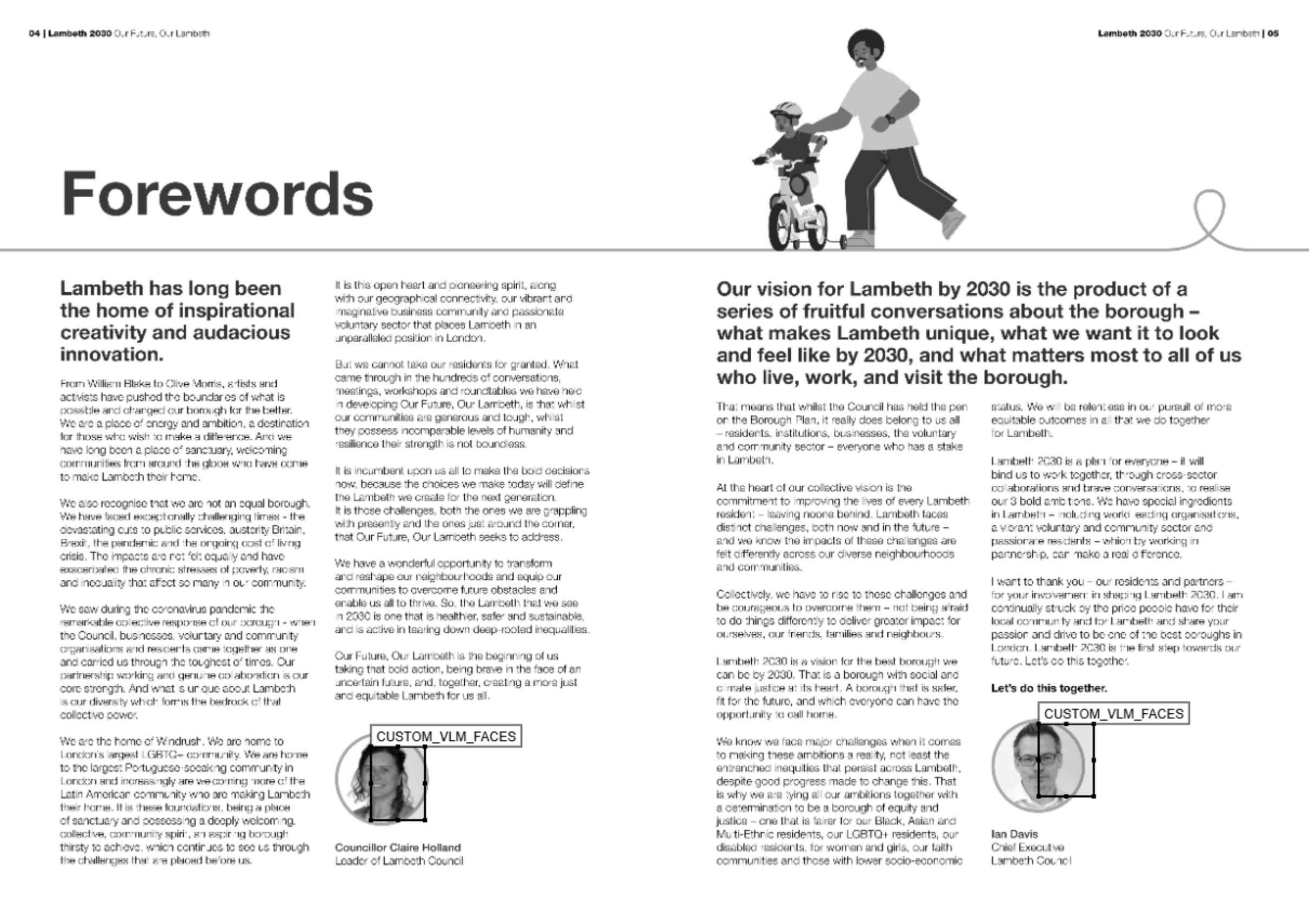
Rating: 7/10 - Like the 35B A3B model, Qwen 3.5 27B identified the faces and located them roughly in the correct position. Like that model, the faces are only partially obscured - not good enough for redaction.
Just to note, I tried the Qwen 3.5 27B model llama.cpp quantised version, and got slightly better results. This highlights that quantisation method can have an impact on the performance of a model, and it is worth trying out different versions to see which works best.
Conclusion
| Model | Face detection |
|---|---|
| Qwen 3 VL 8B Instruct | 7/10 |
| Qwen 3.5 9B | 5/10 |
| Qwen 3.5 35B A3B | 7/10 |
| Qwen 3.5 27B | 7/10 |
All three models identified that there were two photos of faces on the page, and ignored the cartoon drawings, so 10/10 on that part of the task. However, their success with locating bounding boxes varied greatly. The 9B model missed completely, while the 35B A3B and 27B models located the faces roughly in the correct position, although both redaction boxes did not fully cover the face. None of these models could be relied upon to redact faces reliably based on this example.
Additional test - Can a paid Bedrock VLM model (Amazon Nova Pro) do better?
I have found in my testing that Amazon Nova Pro served on AWS is one of the best VLM models available on the platform in terms of locating bounding boxes of text/images on pages (better than even the Claude range of models for this). Based on the above finding, that no Qwen model performs that well on face detection/location on a document page, I wondered if a paid Bedrock VLM model could do better.
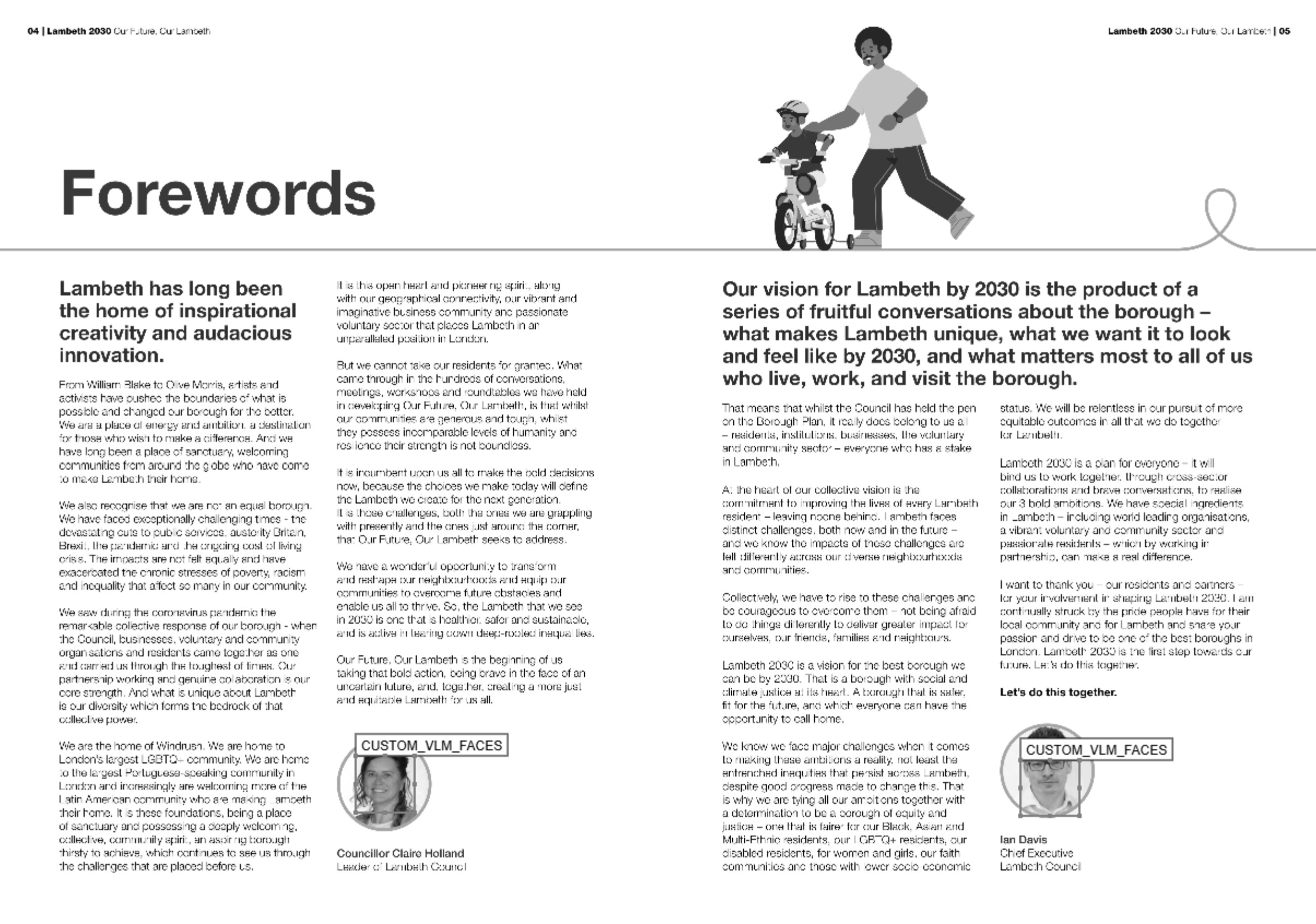
Rating: 8/10 - Amazon Nova Pro identified the faces and located them in the correct position. The bounding boxes are not perfect - they cover the face on the right just above the eyes, but don’t fully cover the forehead.
So, even paid options cannot complete this task reliably. From this perspective, the larger Qwen 3.5 models are performing pretty well. I wonder the inability to cover the faces completely is a prompting issue (perhaps adding instructions to cover the space around any found face would help), or if it’s just the case that VLMs are note quite there in general for this particular task.
Example 3: Custom entity redaction with LLMs
The third task is to classify text according to specific instructions passed to an LLM model. As noted in the last post, small models < 27B were not good at this task, and so I tried it with Gemma 3 27B, which worked well in identifying all the custom entities in the correct location.
Let’s see how Qwen 3.5 does. In this case, due to Hugging Face’s limited VRAM, I used the 9B model on the demonstration app. The results for the other two models (35B A3B and 27B) come from the llama.cpp deployment of the model that you can run yourself here (24 GB VRAM ideal - 16 GB VRAM could work with a lower n-gpu-layers setting, or –n-cpu-moe setting for the 35B A3B model).
The custom instructions used for this task were:
“Redact Lauren’s name (always cover the full name if available), email addresses, and phone numbers with the label LAUREN. Redact university names with the label UNIVERSITY. Always include the full university name if available.”
The full prompt and response text log files for this task can be found in the text files in the subfolders here.
Qwen 3 VL 8B Instruct
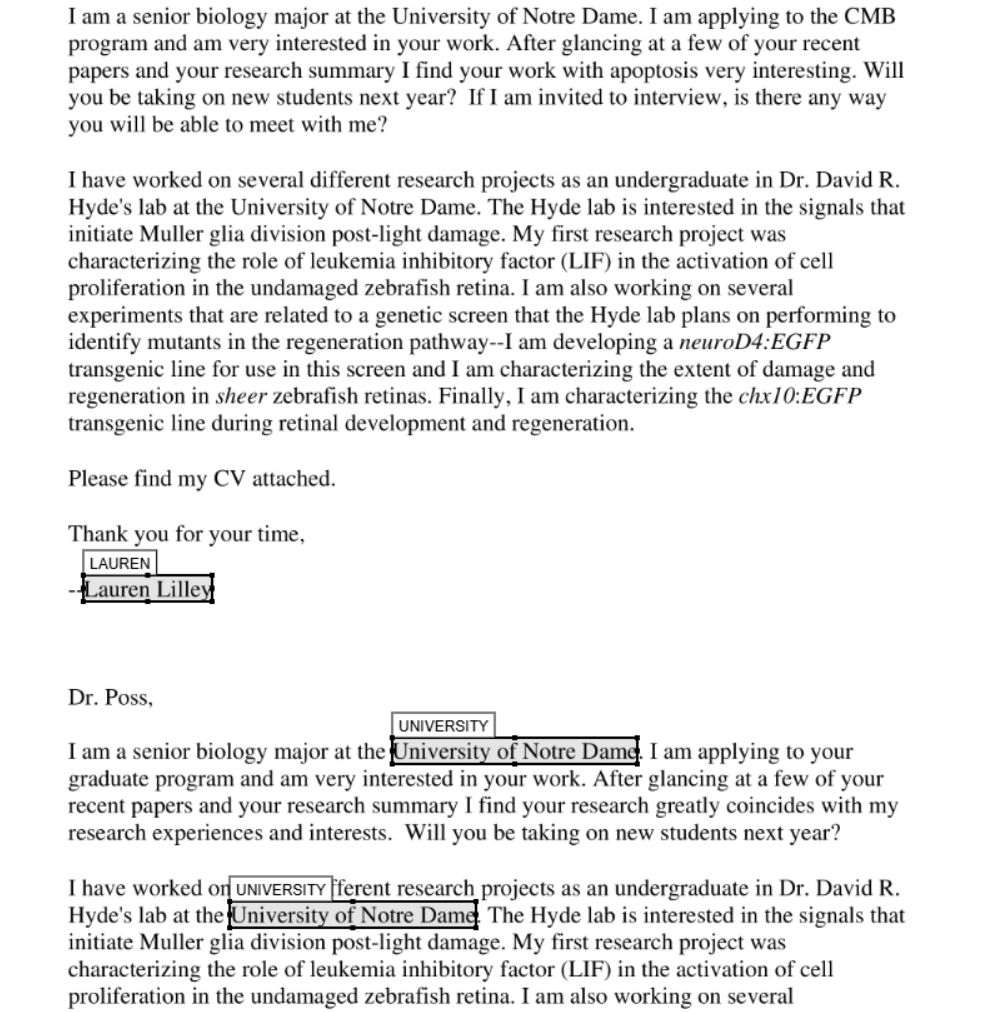
Rating: 6.5/10 - The Qwen 3 VL 8B Instruct model missed the first two instances of the university name, but got the name and the last two university names correct. Not good enough.
Qwen 3.5 9B (Hugging Face space)
To try the Qwen 3.5 9B model with this example, at the Hugging Face space, click the fourth example name, ‘Example email LLM PII detection’, then click ‘Redact document’ below.
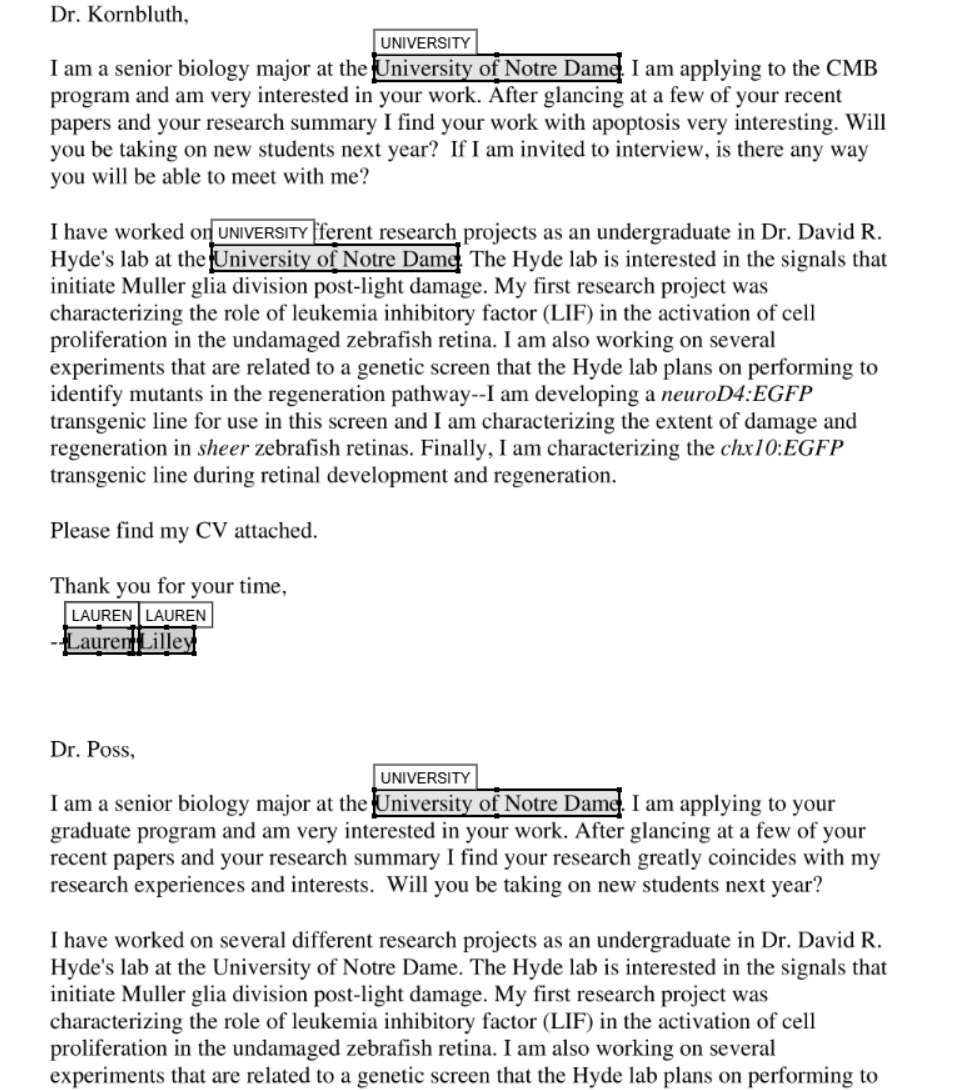
Rating: 7/10 - The Qwen 3.5 9B model identified the entities mostly correctly, and located them roughly in the correct position. However, it missed the university label towards the bottom of the page in the second LLM call for the document. This model is probably too inconsistent to use reliably for this task.
Qwen 3.5 35B A3B (llama.cpp)
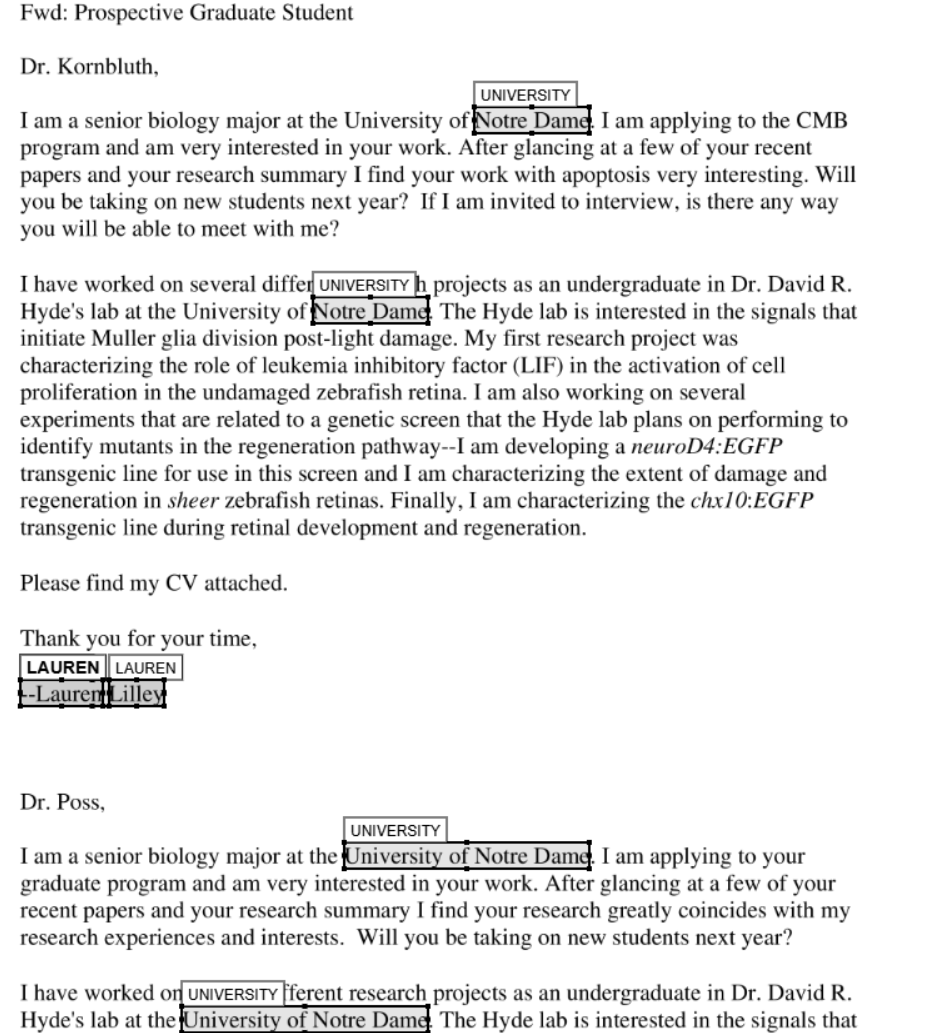
Rating: 8/10 - The Qwen 3.5 35B A3B model identified the entities mostly correctly, and located them roughly in the correct position. However, its labelling is inconsistent. The first labels in the document cover just the university name, while the second pair of university names redacted completely, covering the ‘University of…’ text, which was asked of by the instructions. Better, but still not quite there.
Qwen 3.5 27B (llama.cpp)
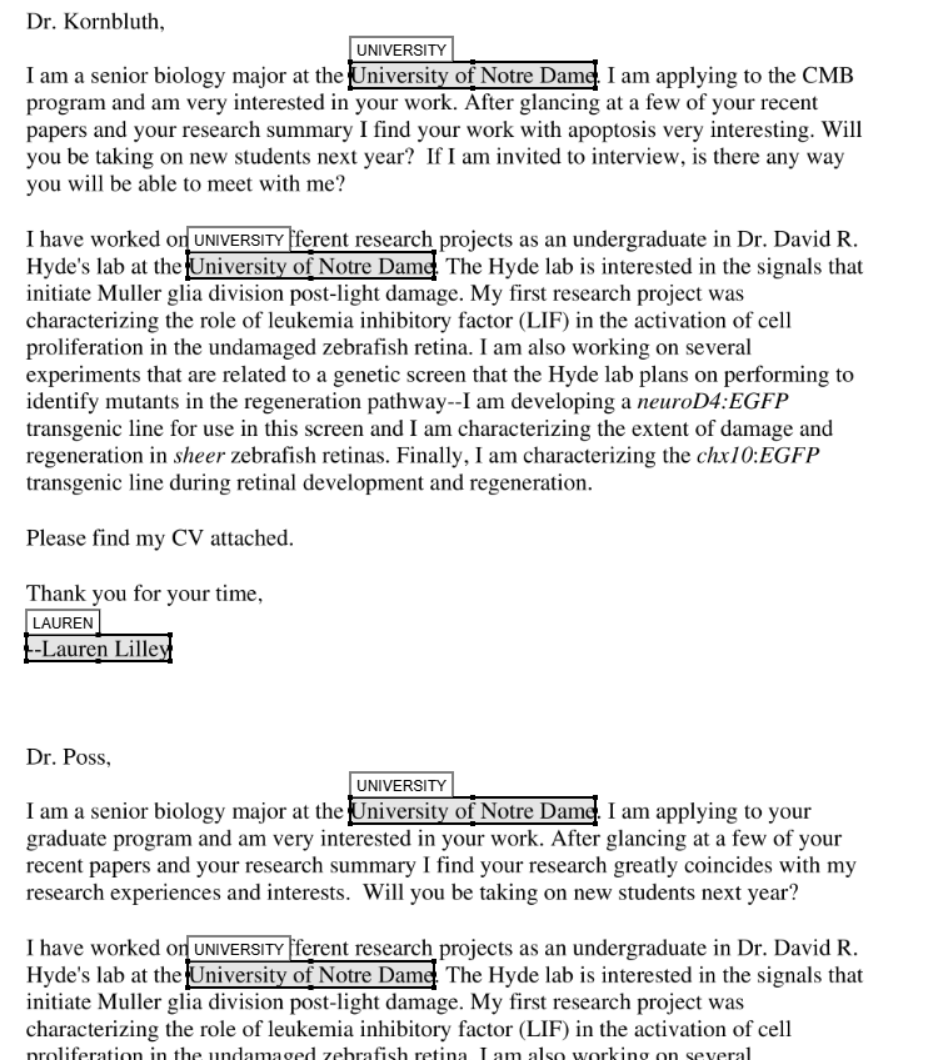
Rating: 10/10 - The Qwen 3.5 27B model identified the entities correctly, and located them in the correct position.
Conclusion
| Model | Custom entity identification |
|---|---|
| Qwen 3 VL 8B Instruct | 6.5/10 |
| Qwen 3.5 9B | 7/10 |
| Qwen 3.5 35B A3B | 7.5/10 |
| Qwen 3.5 27B | 10/10 |
The Qwen 3.5 27B model aced this one. The advantage over using another model such as Gemma 3 27B is that this model could be used to do both VLM and LLM tasks, and so would be much more VRAM efficient.
Overall conclusion
| Model | Text identification | Face detection | Custom entity identification | Overall rating |
|---|---|---|---|---|
| Qwen 3 VL 8B Instruct | 7/10 | 7/10 | 6.5/10 | 6.8/10 |
| Qwen 3.5 9B | 8/10 | 5/10 | 7/10 | 6.7/10 |
| Qwen 3.5 35B A3B | 8/10 | 7/10 | 7.5/10 | 7.5/10 |
| Qwen 3.5 27B | 8.5/10 | 7/10 | 10/10 | 8.5/10 |
Overall, the Qwen 3.5 27B model is the overall winner across all three tasks. It can read difficult handwritten text, it can identify photos of faces on a page and locate them with some accuracy, and it can follow relatively complex custom instructions to identify custom entities in open text. It can also compete in performance with paid Bedrock VLM models for tasks such as face detection. This leaves open the possibilty that local redaction processes with open source VLMs/LLMs can almost equal paid options with only access to a consumer level GPU needed.
Surprisingly, the Qwen 3 VL 8B Instruct model performed surprisingly well compared to Qwen 3.5 9Bacross all three tasks. Qwen 3.5 9B was also let down by a terrible face detection performance. Both models are not large enough it seems to be reliable enough for ‘difficult’ redaction tasks, as demonstrated in this post.
Recommendations for local VLM use in redaction workflows
Based on the above findings, this is what I would recommend for use with different tasks:
- For general OCR/redaction tasks: use (in order) simple text extraction with a package like pymupdf, and for pages with images, use a hybrid PaddleOCR + Qwen 3.5 27B VLM approach. PaddleOCR will deal with all the ‘easy’ typewritten text, and the Qwen 3.5 27B VLM will deal with the more difficult handwriting.
- For documents with very difficult handwriting: use Qwen 3.5 27B VLM, with manual checking and perhaps a second run through the model to pick up any text missed by the model (due to it’s inherent ‘laziness’ in not identifying all text).
- Face or signature detection: use Qwen 3.5 27B VLM, with manual checking to manually adjust the bounding boxes to cover the face or signature if needed. Perhaps adjust the instructions to ask the model to cover the space around the face or signature if needed.
- Custom entity identification: use Qwen 3.5 27B LLM for any custom entity identification tasks.